
Icosidodecahedron Construction in GeoGebra: 30 Vertices
Loading the math board and drawing, please wait…
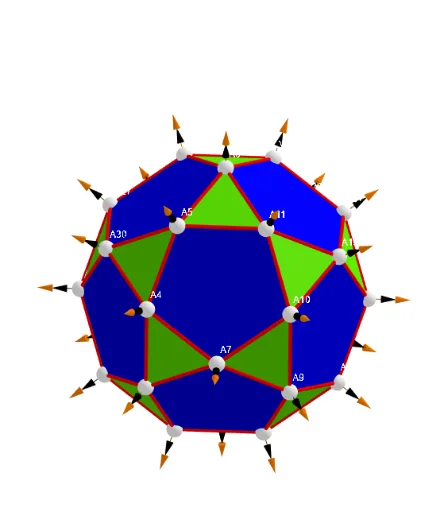
① This example demonstrates how to construct an icosidodecahedron, an Archimedean solid with 30 vertices, composed of regular pentagons and equilateral triangles, using GeoGebra's 3D capabilities. ② Core mathematical concepts include solid geometry, polyhedra, Euler's formula, vertex-edge-face relationships, truncation of regular polyhedra, and spatial coordinates. ③ Construction highlights: from the summary, the construction uses GeoGebra commands such as Sphere, Zip, Sum, Text, and TableText, along with numerous objects like Points00 (vertex list), Segments (edges), multiple buttons (button2/3/4) for interactive control, vectors (lVector1/lVector2), and text labels (txt_p, txtUm1), reflecting a parametric and dynamic approach. ④ This is suitable for high school or university-level geometry courses, helping students visualize Archimedean solids, understand vertex coordinates, and explore 3D modeling techniques; it also serves as an example for mathematical modeling or computer-assisted geometry instruction.
GeoGebra Commands & Parameters
UnicodeToLetter(34) → u34Text("" + Um1) → txt_pSum(Flatten[Sequence[Append[Sequence[Element[txt_p, i], i, m01(k), m02(k)], " "], k, 1, 5]]) → txtUm1Zip(Vector[a, a + UnitVector[a]], a, Points00) → lVector1Zip(Vector[a, a + (1.5 * UnitVector[b])], a, Points00, b, Wi_Pc) → lVector2Zip(Vector[a, a + (1.5 * UnitVector[b])], a, Points00, b, Wi_P) → lVector3Sphere((0, 0, 0), 5) → sphTableText(Append["i", 1…n], Append[" \fgcolor{orange}{GM :Δφ_i}, rad", l1w], Append["\fgcolor{magenta}{GC :Δφ_i} , rad", l1cw], "v") → text23rZip(Segment[Element[Points00, y(a)], Element[Points00, z(a)]], a, ll1bb(1)) → ll1Zip(Segment[Element[Points00, y(a)], Element[Points00, z(a)]], a, ll1bb(2)) → ll2Zip(Segment[Element[Points00, y(a)], Element[Points00, z(a)]], a, ll1bb(3)) → ll3Zip(Segment[Element[Points00, y(a)], Element[Points00, z(a)]], a, ll1bb(4)) → ll4Zip(Segment[Element[Points00, y(a)], Element[Points00, z(a)]], a, ll1bb(5)) → ll5Zip(Segment[Element[Points00, y(a)], Element[Points00, z(a)]], a, ll1bb(6)) → ll6Zip(Segment[Element[Points00, y(a)], Element[Points00, z(a)]], a, ll1bb(7)) → ll7Zip(Segment[Element[Points00, y(a)], Element[Points00, z(a)]], a, ll1bb(8)) → ll8