
Icosian Game
Loading the math board and drawing, please wait…
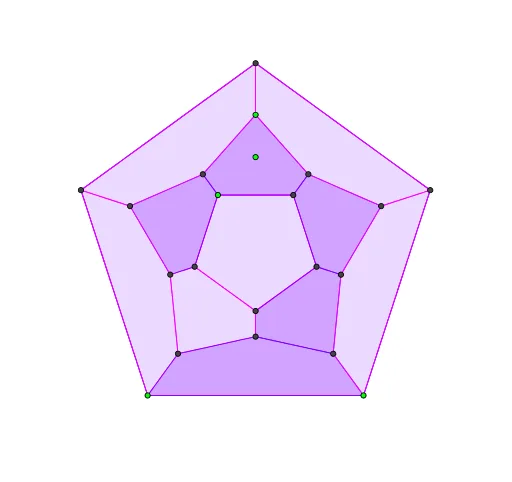
This example demonstrates the Icosian game, involving polygons and geometric construction. Using GeoGebra commands such as Polygon, AngularBisector, Point, Line, etc., the icosahedron can be constructed. Suitable for high school students or math enthusiasts to learn and explore geometric shapes.
GeoGebra Commands & Parameters
Polygon(A, B, 5) → poly1, a, b, c, d, e, C, D, EAngularBisector(E, A, B) → fAngularBisector(A, B, C) → gAngularBisector(B, C, D) → hAngularBisector(C, D, E) → iAngularBisector(D, E, A) → jPoint(g) → FLine(F, a) → kIntersect(f, k) → GPolygon(G, F, 5) → poly2, l, m, n, p, q, H, I, JPoint(i) → KIntersect(i, f) → LCircle(L, K) → rIntersect(r, g, 2) → MIntersect(r, f, 2) → NIntersect(r, j, 2) → OIntersect(r, i, 2) → PIntersect(r, h, 2) → QPoint(i) → RCircle(L, R) → sIntersect(s, j, 1) → SIntersect(s, f, 1) → TIntersect(s, g, 1) → UIntersect(s, h, 1) → VPolygon(F, G, N, R, M) → poly3, f_1, g_1, n_1, r_1, m_1Polygon(J, I, P, U, O) → poly4, j_1, i_1, p_1, u, oPolygon(I, H, Q, T, P) → poly5, i_2, h_1, q_1, t, p_2Polygon(H, F, M, S, Q) → poly6, h_2, f_2, m_2, s_1, q_2Polygon(G, J, O, V, N) → poly7, g_2, j_2, o_1, v, n_2Polygon(N, V, C, D, R) → poly8, n_3, v_1, c_1, d_1, r_2Polygon(M, R, D, E, S) → poly9, m_3, r_3, d_2, e_1, s_2Polygon(Q, S, E, A, T) → poly10, q_3, s_3, e_2, a_1, t_1Polygon(P, T, A, B, U) → poly11, p_3, t_2, a_2, b_1, u_1Polygon(O, U, B, C, V) → poly12, o_2, u_2, b_2, c_2, v_2
AI Drawing Prompt Reference
Draw a regular pentagon. Construct angle bisectors at each vertex. Pick a point on one bisector and connect it to a side of the pentagon to get an intersection. Use this intersection and another point on a bisector to form a second regular pentagon. Then, with the intersection of two bisectors as center, draw two circles of different radii. Mark points where these circles meet the bisectors)Skip. Connect these points to form several pentagons, creating a polyhedral-like network of interconnected pentagonal faces.
The prompt above was compiled from the original drawing commands and is for reference only.