
Icosahedron Exploration Template
Loading the math board and drawing, please wait…
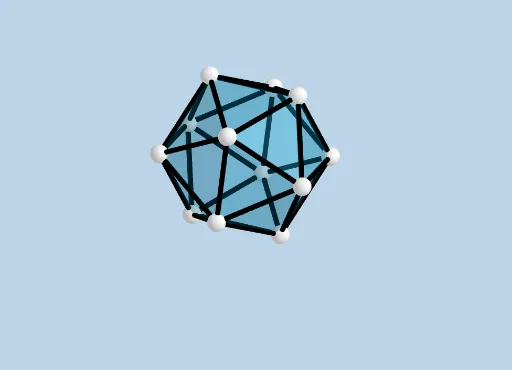
This example demonstrates the construction of an icosahedron. Key mathematical concepts include solid geometry and geometric construction. Using GeoGebra commands such as Intersect, Point, and Icosahedron, the faces and edges of the icosahedron can be constructed. Suitable for high school and above students or teachers for teaching and learning solid geometry.
GeoGebra Commands & Parameters
Intersect(yAxis, xAxis) → APoint(xAxis) → BPoint(Circle[Midpoint[A, B], (Distance[A, B] * sqrt(3) / 2), Segment[A, B]]) → CIcosahedron(A, B, C) → a, D, faceABC, faceACF, faceAFG, faceADG, faceABD, faceBDH, faceBEH, faceBCE, faceCEI, faceCFI, E, faceEHK, faceEIK, faceIKL, faceFIL, faceHJK, faceJKL, faceGJL, faceFGL, faceDHJ, faceDGJ, F, edgeAC, edgeAB, edgeBC, edgeAF, edgeCF, edgeAG, edgeFG, edgeAD, edgeDG, edgeBD, G, edgeBH, edgeDH, edgeBE, edgeEH, edgeCE, edgeCI, edgeEI, edgeFI, edgeEK, edgeHK, H, edgeIK, edgeIL, edgeKL, edgeFL, edgeJK, edgeHJ, edgeJL, edgeGL, edgeGJ, edgeDJ, I, J, K, LNet(a, CreateNet) → c, M, V, W, Z, A_1, B_1, C_1, D_1, E_1, F_1, G_1, N, H_1, I_1, J_1, faceMNO, faceMOP, faceMPQ, faceMVW, faceMNV, face2, face3, O, face1, face4, faceOPT, face6, face7, face9, facePTU, face8, face10, faceQRS, P, facePQR, face5, faceVWZ, edgeMO, edgeMN, edgeNO, edgeOP, edgeMP, edgePQ, edgeMQ, Q, edgeMV, edgeMW, edgeVW, edgeNV, edge6, edge1, edge2, edge3, edge9, edge4, R, edge11, edge5, edgeOT, edgePT, edge13, edge10, edge12, edge16, edge18, edge17, S, edgeTU, edgePU, edge14, edge15, edge19, edge20, edgeQR, edgeRS, edgeQS, edgePR, T, edge7, edge8, edgeWZ, edgeVZ, U
AI Drawing Prompt Reference
Draw an icosahedron with 20 equilateral triangular faces and 30 edges. Start by finding the intersection point A of the y-axis and x-axis, then take a point B on the x-axis, construct the top vertex C of an equilateral triangle with base AB, and finally use the Icosahedron command with points A, B, and C as starting points to build the entire icosahedron, including all faces and edges.
The prompt above was compiled from the original drawing commands and is for reference only.