
Icosahedron as a Planar Graph Visualization
Loading the math board and drawing, please wait…
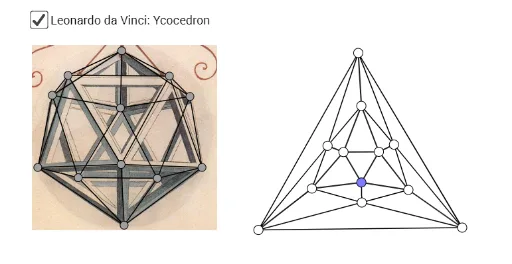
This example demonstrates how to represent an icosahedron, a regular polyhedron with 20 triangular faces, as a planar graph by projecting its vertices and edges onto a two-dimensional plane while preserving the topological structure. The core mathematical concepts include planar graph representation of polyhedra, Euler's formula (V - E + F = 2), the symmetry of the regular icosahedron, and the topological properties of polygonal meshes. Construction highlights: using GeoGebra's Polygon command to create multiple triangular faces (e.g., veelhoek1, veelhoek2, etc.) and Segment command to connect vertices (A, B, E, F, G, H, I, J, K, L, M, N, O, P, etc.) as edges, along with transformations (afbeelding1) and auxiliary objects (f, g, h, etc.) to precisely position vertices, resulting in a planar embedding of twenty triangular faces. This example is suitable for high school or university courses in solid geometry, graph theory, or mathematical visualization, helping students intuitively understand the correspondence between polyhedra and planar graphs and how to represent 3D structures in 2D.
GeoGebra Commands & Parameters
Polygon(E, F, 3) → veelhoek1, f, g, h, GPolygon(H, I, 3) → veelhoek2, i, j, k, JPolygon(K, L, 3) → veelhoek3, l, m, n, MPolygon(N, O, 3) → veelhoek4, p, q, r, PSegment(G, J) → sSegment(P, L) → dSegment(P, J) → eSegment(J, O) → f_1Segment(P, O) → g_1Segment(O, I) → h_1Segment(I, F) → i_1Segment(H, N) → j_1Segment(N, I) → k_1Segment(P, N) → l_1Segment(N, O) → m_1Segment(H, E) → n_1Segment(P, H) → p_1Segment(O, K) → q_1Segment(N, M) → t_1Segment(G, E) → a_1Segment(E, F) → b_1Segment(F, G) → c_1Segment(R, Q) → d_1Segment(Q, S) → e_1Segment(Q, V) → f_2Segment(Q, T) → g_2Segment(T, U) → h_2Segment(U, V) → i_2Segment(R, A_1) → j_2Segment(T, B_1) → k_2Segment(R, Z) → l_2Segment(U, B_1) → m_2Segment(U, C_1) → n_2Segment(V, C_1) → p_2Segment(V, W) → q_2Segment(A_1, Z) → r_2Segment(Z, W) → s_2Segment(A_1, D_1) → t_2Segment(B_1, D_1) → a_2Segment(A_1, B_1) → b_2Segment(B_1, C_1) → c_2Segment(C_1, W) → d_2Segment(D_1, W) → e_2Segment(C_1, D_1) → f_3Segment(Z, D_1) → g_3Segment(S, V) → h_3Segment(Q, U) → i_3Segment(S, Z) → j_3Segment(R, S) → k_3Segment(T, A_1) → l_3Segment(R, T) → m_3Segment(S, W) → n_3Segment(G, L) → tSegment(L, H) → p_3Segment(G, K) → r_1Segment(K, I) → q_3Segment(E, M) → aSegment(M, I) → r_3Segment(H, M) → bSegment(M, F) → s_3Segment(E, L) → s_1Segment(L, J) → t_3Segment(J, K) → cSegment(K, F) → a_3