
Icosahedral Cones
Loading the math board and drawing, please wait…
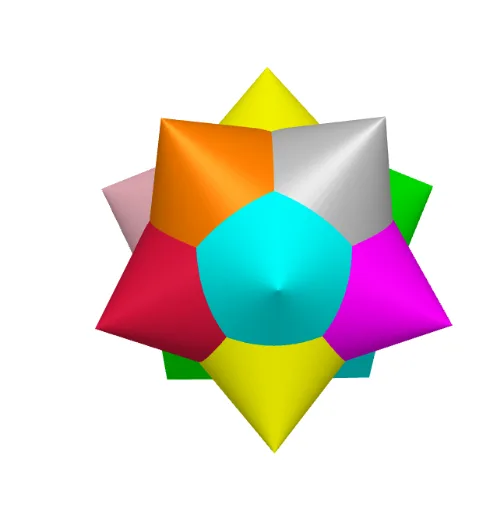
This example demonstrates the construction of Icosahedral Cones, integrating polyhedra with conical shapes. Key math concepts include polygons, solid geometry, parametric curves, and 3D vectors. GeoGebra commands and objects used are Point, Rotate, Icosahedron, Circle, and Cone. Suitable for high school and above students exploring applications of solid geometry and parametric equations.
GeoGebra Commands & Parameters
Point(xAxis) → ARotate(A, (2 * π / 3)) → A'Point(Circle[Midpoint[A, A'], (Distance[A, A'] * sqrt(3) / 2), Segment[A, A']]) → BIcosahedron(A, A', B) → a, C, faceAA'B, faceABE, faceAEF, faceACF, faceAA'C, faceA'CG, faceA'DG, faceA'BD, faceBDH, faceBEH, D, faceDGJ, faceDHJ, faceHJK, faceEHK, faceGIJ, faceIJK, faceFIK, faceEFK, faceCGI, faceCFI, E, edgeAB, edgeAA', edgeA'B, edgeAE, edgeBE, edgeAF, edgeEF, edgeAC, edgeCF, edgeA'C, F, edgeA'G, edgeCG, edgeA'D, edgeDG, edgeBD, edgeBH, edgeDH, edgeEH, edgeDJ, edgeGJ, G, edgeHJ, edgeHK, edgeJK, edgeEK, edgeIJ, edgeGI, edgeIK, edgeFK, edgeFI, edgeCI, H, I, J, KCircle(K, E, I) → cCircle(K, E, J) → dCircle(K, F, J) → eCircle(K, F, H) → fCircle(K, I, H) → gCircle(F, I, E) → hCircle(F, E, C) → kCircle(F, I, A) → pCircle(J, I, C) → qCircle(G, C, A) → rCircle(G, J, A') → sCircle(H, D, A') → tCone(k, 3) → a_1, a_2, a_3Cone(c, 3) → b, b_2, b_3Cone(p, -3) → h_1, h_2, h_3Cone(d, -3) → j, j_5, j_6Cone(q, 3) → j_1, j_2, j_3Cone(e, 3) → l, l_4, l_6Cone(r, 3) → l_1, l_2, l_3Cone(f, -3) → n, n_4, n_6Cone(s, -3) → n_1, n_2, n_3Cone(g, 3) → o, o_2, o_3Cone(t, 3) → r_1, r_2, r_3Cone(h, 3) → v, v_2, v_3
AI Drawing Prompt Reference
Create an icosahedral cone combination. Start by creating a point A, then rotate it to generate point A'. Next, construct a circle with the midpoint of A and A' as the center and the distance between A and A' as the radius, and select a point B on this circle. Use points A, A', and B to construct an icosahedron. Around each face and edge of the icosahedron, construct multiple circles, and use these circles as bases to create cones both upwards and downwards.
The prompt above was compiled from the original drawing commands and is for reference only.