
Hypercube
Loading the math board and drawing, please wait…
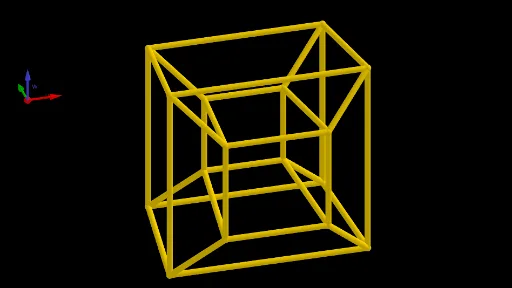
This example demonstrates the geometric construction of a hypercube, a geometric figure in four-dimensional space similar to a cube in three-dimensional space. Key mathematical concepts include points, lines, planes, and solids in four-dimensional space. Using GeoGebra commands such as Point, Line, Midpoint, and OrthogonalPlane, the various components of the hypercube are constructed. Suitable for high school students and anyone interested in four-dimensional geometry.
GeoGebra Commands & Parameters
Point(zAxis) → APoint(xAxis) → BLine(A, B) → fMidpoint(A, B) → COrthogonalPlane(C, f) → aMirror(D, C) → D'CurveCartesian(2 + sin(t), (-2.45 * cos(t)), sin(t) + 2, t, 0, (2 * π)) → bPolygon(H, G, F, I) → q1, h, g, f_1, iPlane(zAxis, yAxis) → cMirror(q1, c) → q1'Mirror(q1, xOyPlane) → q1'_1Mirror(q1', xOyPlane) → q1''Mirror(G, c) → G'Mirror(F, c) → F'Mirror(H, c) → H'Mirror(I, c) → I'Mirror(I', xOyPlane) → I''Mirror(H', xOyPlane) → H''Mirror(G', xOyPlane) → G''Mirror(F', xOyPlane) → F''Mirror(I, xOyPlane) → I'_1Mirror(F, xOyPlane) → F'_1Mirror(H, xOyPlane) → H'_1Mirror(G, xOyPlane) → G'_1Segment(H', H'') → jSegment(I', I'') → kSegment(G'', G') → lSegment(F', F'') → mSegment(I'', I'_1) → pSegment(H'', H'_1) → qSegment(G'_1, G'') → rSegment(F'', F'_1) → sSegment(I'_1, I) → tSegment(H, H'_1) → dSegment(G, G'_1) → eSegment(F, F'_1) → g_1Segment(H', H) → h_1Segment(I', I) → i_1Segment(G', G) → j_1Segment(F', F) → k_1Vector(J, J + (1, 0, 0)) → uVector(J, J + (0, 1, 0)) → vVector(J, J + (0, 0, 1)) → w
AI Drawing Prompt Reference
Draw a 3D projection of a hypercube. Start with two points on coordinate axes, connect them with a line, and take its midpoint to create a perpendicular plane. Construct a base quadrilateral, then mirror it across coordinate planes and the perpendicular plane to generate eight vertices and twelve edges, forming the hypercube's projection. Finally, add three vectors from the origin along the x, y, and z axes to indicate spatial directions. The result is a symmetric wireframe structure with interconnected quadrilaterals and segments.
The prompt above was compiled from the original drawing commands and is for reference only.