
Hyperboloid of One Sheet
Loading the math board and drawing, please wait…
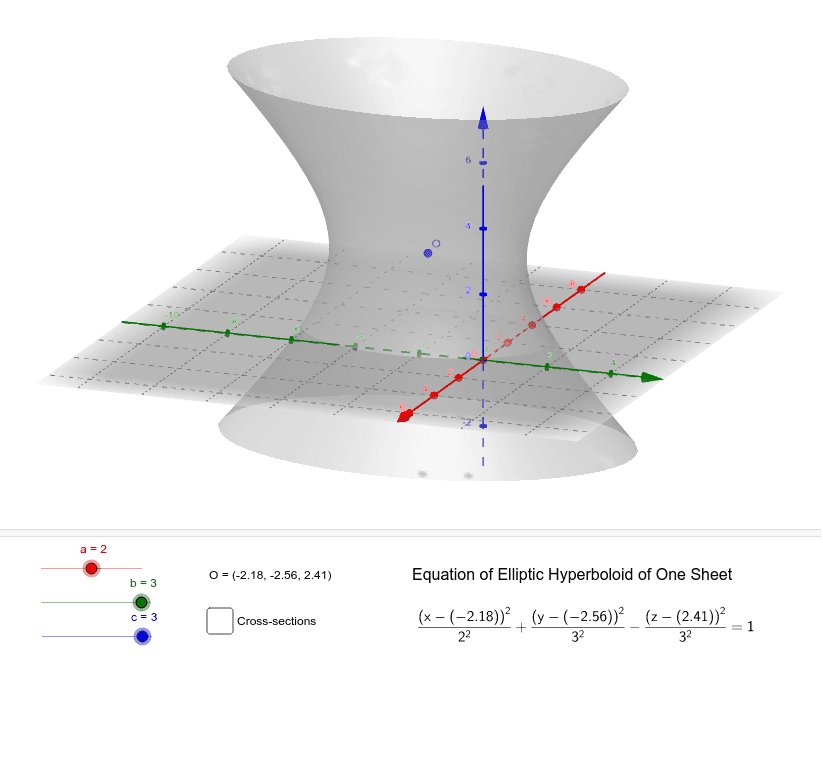
This example demonstrates the 3D geometric shape of an elliptic hyperboloid and its properties. Key math concepts include coordinate geometry, surface equations, parametric equations, and vector operations in 3D space. Construction highlights involve commands like Segment, CurveCartesian, and Surface in GeoGebra, utilizing objects such as a, b, c, O, ox, oy, oz. Suitable for high school and above students to learn complex 3D surfaces and visualize initial concepts of surface integrals in calculus.
GeoGebra Commands & Parameters
Segment(O, B) → fSegment(C, O) → gCurveCartesian((a * cos(t)) + ox, (b * sin(t)) + oy, oz, t, 0, 6.283185307179586) → hSurface(((a * cosh(w)) * cos(v)) + x(O), ((b * cosh(w)) * sin(v)) + y(O), (c * sinh(w)) + z(O), v, 0, 6.28319, w, -6, 6) → dCurveCartesian(x(O), (b * cosh(w)) + y(O), (c * sinh(w)) + z(O), w, -6, 6) → iCurveCartesian(x(O), ((-b) * cosh(w)) + y(O), (c * sinh(w)) + z(O), w, -6, 6) → eCurveCartesian((a * cosh(w)) + x(O), y(O), (c * sinh(w)) + z(O), w, -6, 6) → jCurveCartesian(((-a) * cosh(w)) + x(O), y(O), (c * sinh(w)) + z(O), w, -6, 6) → l
AI Drawing Prompt Reference
Draw a one-sheet hyperboloid centered at the origin with semi-axes a, b, and c. First, draw two line segments from the origin along the positive x-axis and positive y-axis as reference axes. Then draw an ellipse in the z=0 plane with parametric equations x=a*cos(t), y=b*sin(t). Next, generate the hyperboloid surface using parametric equations where the horizontal cross-sections are ellipses and the vertical profile follows hyperbolic functions. Finally, draw four hyperbolic curves: two in the x=0 plane along positive and negative y directions, and two in the y=0 plane along positive and negative x directions. All curves are symmetric about the origin.
The prompt above was compiled from the original drawing commands and is for reference only.