
Complex Number and Geometry I - Vector Addition
Loading the math board and drawing, please wait…
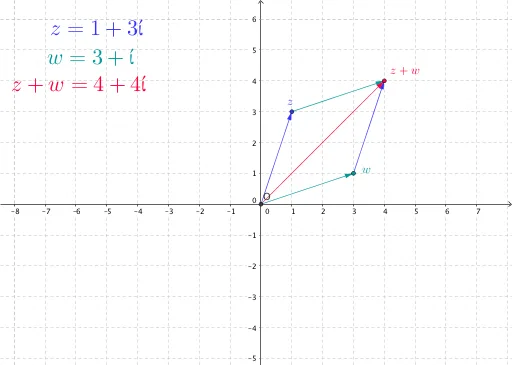
This example demonstrates vector addition in complex number and geometry. It visualizes vector addition using the parallelogram law. Core math concepts include the geometric interpretation of complex numbers, vector operations, and geometric constructions. Key GeoGebra commands and objects used are Intersect, Vector, and Translate to construct and illustrate the vector addition process. Suitable for high school mathematics teaching, helping students understand the relationship between complex numbers and vectors and their geometric applications.
GeoGebra Commands & Parameters
Intersect(xAxis, yAxis) → OVector(O, z) → uVector(O, w) → vTranslate(z, v) → z'Vector(z, z') → aTranslate(w, u) → w'Vector(w, w') → bVector(O, z') → c
AI Drawing Prompt Reference
Draw a geometric illustration showing vector addition using complex numbers, visualized with the parallelogram law. Start by plotting the intersection point of the coordinate axes, then draw two vectors from the origin representing complex numbers. Next, translate one vector so its tail meets the head of the other, forming a parallelogram. Finally, draw the vector from the origin to the opposite corner of the parallelogram to show the result of vector addition.
The prompt above was compiled from the original drawing commands and is for reference only.