
GeoGebra Lagrange Multiplier Tutorial: Demonstrating Constrained Optimization
Loading the math board and drawing, please wait…
In collections
₂ΛM 1: Lagrange Multipliers with One Constraint. Examples
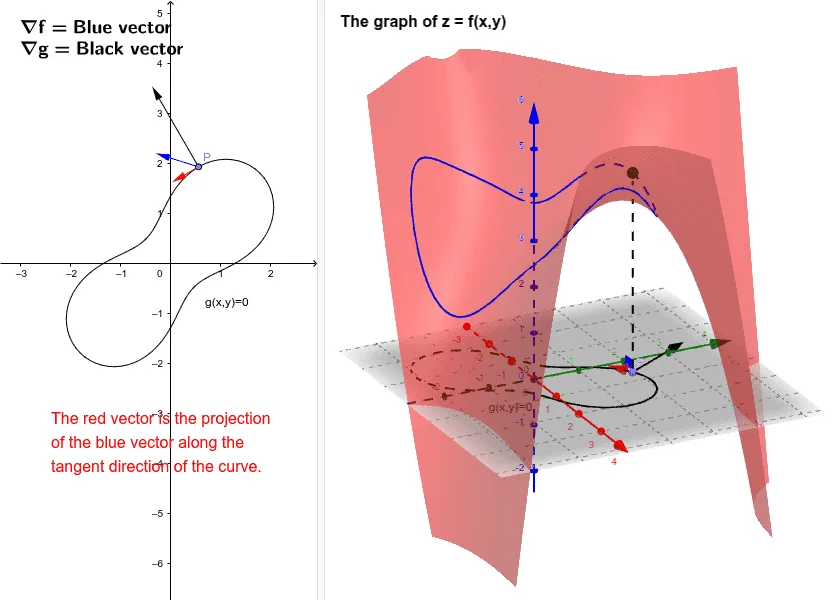
This tutorial demonstrates the Lagrange Multiplier method in constrained optimization using GeoGebra. Key mathematical concepts include Lagrange multipliers, constraint conditions, and extreme points. Construction involves using commands like CurveCartesian, Point, Vector, Translate, Segment, Tangent, OrthogonalLine, and Intersect to build functions, points, vectors, line segments, tangents, and orthogonal lines, then determining intersection points. Suitable for high school students or college undergraduates learning calculus and optimization methods, also useful for mathematical modeling exercises.
GeoGebra Commands & Parameters
CurveCartesian((r(t) * cos(t)), (r(t) * sin(t)), t, 0, 6.283185307179586) → aCurveCartesian((r(t) * cos(t)), (r(t) * sin(t)), f((r(t) * cos(t)), (r(t) * sin(t))), t, 0, 6.283185307179586) → bPoint(a) → PVector((((2 * x(P)) - y(P)^(2)) / 3, ((((-2) * y(P)) * x(P)) + 3) / 3)) → ffTranslate(P, ff) → P'Vector(P, P') → uTranslate(P, gg) → P'_1Vector(P, P'_1) → vSegment(P, Q) → cTangent(P, a) → dOrthogonalLine(P', d) → eIntersect(e, d) → AVector(P, A) → w
AI Drawing Prompt Reference
Draw a geometric diagram for constrained optimization. First, create a closed constraint curve (such as a circle or ellipse). Then select a moving point P on the curve. Through P, draw the tangent line to the curve. Through another related point P', construct a line perpendicular to this tangent. The intersection point of these two lines represents the extreme point A. Finally, use arrows to show the vector relationship from the tangent point P to the extreme point A, illustrating the geometric meaning of the Lagrange multiplier method: the gradient direction is perpendicular to the tangent direction of the constraint curve.
The prompt above was compiled from the original drawing commands and is for reference only.