
Extrema and Intercepts of Quadratic Functions: Parabola Parts via GeoGebra
Loading the math board and drawing, please wait…
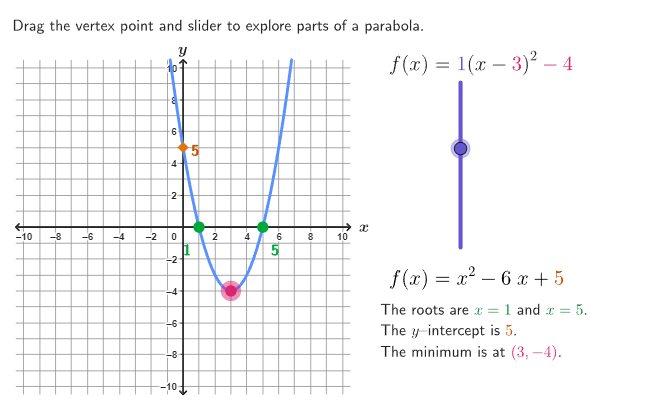
This GeoGebra example interactively demonstrates how the key parts of a parabola—its extrema (maximum/minimum) and its intercepts with the axes—are represented by the underlying quadratic function. It focuses on the relationship between a quadratic’s analytic form and its graph features, including the concepts of vertex/extrema, opening and symmetry, x- and y-intercepts, and how solving for roots corresponds to graph intersection points. Construction highlights include using Corner, Polygon, Segment, Translate, and Flatten to build and organize the geometric layout; Point and Text for labeling and marking critical points; Root to connect equation solutions to intercepts; circlePixels for auxiliary circular/pixel-based elements; and RemoveUndefined to keep constructions consistent. Guide lines and axes placeholders (MoveGuideLine, hGuideline, vGuideline, xAxisFake, yAxisFake) support the interactive exploration. Intended for grades 9–12 learners and classroom activities emphasizing reasoning about extrema and intercept-finding processes.
GeoGebra Commands & Parameters
Corner(5) → AppSizePolygon({ViewCorner1_{1}, (x(ViewCorner3_{1}), y(ViewCorner1_{1})), ViewCorner3_{1}, (x(ViewCorner1_{1}), y(ViewCorner3_{1}))}) → q1_{1}Segment((x(ViewCorner1_{1}), 0), (x(ViewCorner3_{1}), 0)) → xAxisFake_{1}Segment((0, y(ViewCorner1_{1})), (0, x(ViewCorner3_{1}))) → yAxisFake_{1}Translate(hGuideline, Vector[(Vector[Corner[1], Corner[4]] / 500 * 16)]) → hGuideline'Flatten(Sequence[Sequence[(ii, jj), ii, -10, 10], jj, -10, 10]) → grid1Point(grid1) → DraggableRoot(f) → A, BRemoveUndefined({A, B}) → l2Text(x(A), A + (0, If[a ≥ 0, -0.5, 0]), true, true, If[Length[l2] ≟ 1, 0, -1], If[a ≥ 0, -1, 1]) → text3Text(x(B), B + (0, If[a ≥ 0, -0.5, 0]), true, true, 1, If[a ≥ 0, -1, 1]) → text4Text(y(C), C, true, true, 1, 0) → text5Text("y", (0, 10), true, true, 0, 1) → text2_{1}Text("x", (10.5, 0.1), true, true, 1, 0) → text1_{1}circlePixels(Draggable, 9 + (7 * pulsing), Cor1, Cor3, (800, 500)) → pulsingObject
AI Drawing Prompt Reference
Draw a complete graph of a quadratic function parabola, including coordinate axes and a grid background. The parabola's opening direction depends on the sign of the quadratic coefficient. Mark the vertex (extremum point), the x-intercepts (if any), and the y-intercept. Label the x or y coordinates next to each intercept. Place 'x' and 'y' labels at the ends of the axes. Include a draggable guide line for dynamic exploration, and a pulsing circular marker that responds to dragging to highlight the current focus. The layout should clearly show the parabola's symmetry, extremum, and intercept relationships.
The prompt above was compiled from the original drawing commands and is for reference only.