
How to Color an Item in a List: GeoGebra Sequence and Element Example
Loading the math board and drawing, please wait…
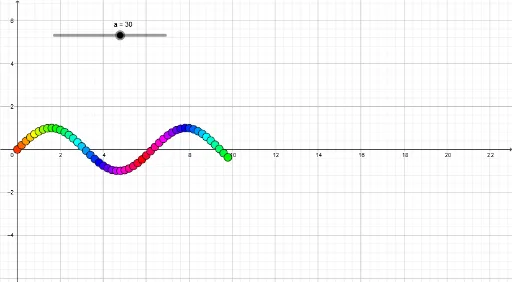
This example demonstrates how to color specific items within a list in GeoGebra using the Sequence and Element commands, allowing users to visually highlight certain terms of a sequence. The core mathematical concepts involve sequences and stochastic processes, while also incorporating parabolas, translations, arithmetic, and volume to create a rich geometric context. The construction uses the Sequence command to generate a list l1 containing points A1 through A39, then applies the Element command to select particular items and assigns them distinct colors via object properties)Skip. This approach enables dynamic visualization of selected list elements, making it ideal for middle and high school mathematics teachers to illustrate sequences, random processes, or geometric object lists interactively. It also serves as a practical tutorial for students learning to manage lists and customize visual attributes in GeoGebra, enhancing their understanding of object manipulation and visual representation in dynamic mathematics software.
GeoGebra Commands & Parameters
Sequence((i, sin(i)), i, 0, 20, 0.2) → l1Element(l1, A1) → B1Element(l1, A2) → B2Element(l1, A3) → B3Element(l1, A4) → B4Element(l1, A5) → B5Element(l1, A6) → B6Element(l1, A7) → B7Element(l1, A8) → B8Element(l1, A9) → B9Element(l1, A10) → B10Element(l1, A11) → B11Element(l1, A12) → B12Element(l1, A13) → B13Element(l1, A14) → B14Element(l1, A15) → B15Element(l1, A16) → B16Element(l1, A17) → B17Element(l1, A18) → B18Element(l1, A19) → B19Element(l1, A20) → B20Element(l1, A21) → B21Element(l1, A22) → B22Element(l1, A23) → B23Element(l1, A24) → B24Element(l1, A25) → B25Element(l1, A26) → B26Element(l1, A27) → B27Element(l1, A28) → B28Element(l1, A29) → B29Element(l1, A30) → B30Element(l1, A31) → B31Element(l1, A32) → B32Element(l1, A33) → B33Element(l1, A34) → B34Element(l1, A35) → B35Element(l1, A36) → B36Element(l1, A37) → B37Element(l1, A38) → B38Element(l1, A39) → B39Element(l1, A40) → B40Element(l1, A41) → B41Element(l1, A42) → B42Element(l1, A43) → B43Element(l1, A44) → B44Element(l1, A45) → B45Element(l1, A46) → B46Element(l1, A47) → B47Element(l1, A48) → B48Element(l1, A49) → B49Element(l1, A50) → B50
AI Drawing Prompt Reference
Create a sequence of 39 points distributed according to the sine function, then highlight specific points with different colors to demonstrate how to select and color elements in a list, visually representing specific terms in the sequence.
The prompt above was compiled from the original drawing commands and is for reference only.