
How Exponential Functions Change: Increasing vs. Decreasing
Loading the math board and drawing, please wait…
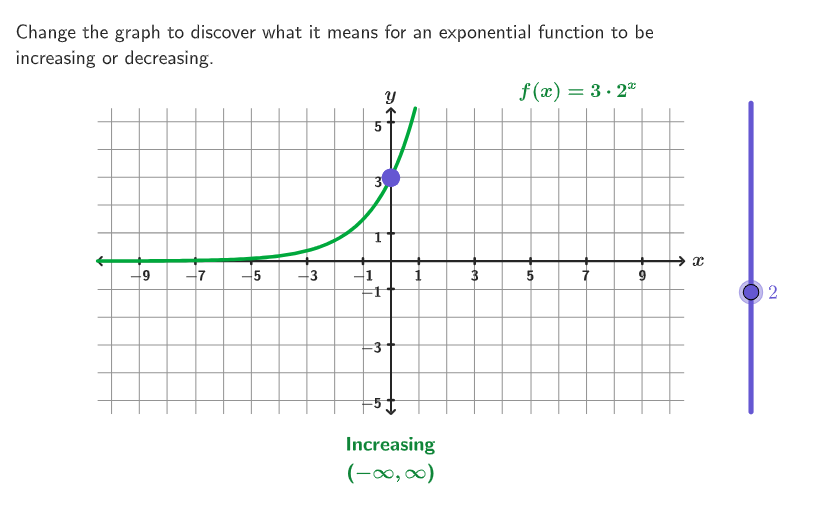
This GeoGebra example uses a slider to help students see how an exponential function’s graph switches between increasing and decreasing behavior as the base (multiplier) value changes. It targets the core ideas of exponential functions, the role of the base in determining monotonicity, how to state the intervals of increase/decrease in terms of parameter ranges, and prompts deeper questions about whether an exponential function can ever appear constant and whether it can change direction. Visually and interactively, the construction relies on geometric and annotation tools—Corner, Polygon, Segment, Point, Text, and Translate—to build and label the coordinate setup and guiding elements, while the exponential curves are driven by parameters such as base with function objects (e.g., f and g) and key plotted positions (Pos1–Pos4). Coordinate scaffolding and readability are enhanced with axis/tick/number objects (xAxisFake, yAxisFake, xAxisNumbers, yAxisTicks, gridPoints) and guide lines (hGuideline, vGuideline, MoveGuideLine), with emphasis effects via pulsing and color settings. Suitable for grades 9–12 and classroom exploration of function behavior and interval-based monotonicity descriptions.
GeoGebra Commands & Parameters
Corner(5) → AppSizePolygon({ViewCorner1_{1}, (x(ViewCorner3_{1}), y(ViewCorner1_{1})), ViewCorner3_{1}, (x(ViewCorner1_{1}), y(ViewCorner3_{1}))}) → q1_{1}Segment((x(ViewCorner1_{1}), 0), (x(ViewCorner3_{1}), 0)) → xAxisFake_{1}Text("x", (11, 0.1), true, true, 0, 0) → text1_{1}Sequence((0, ii), ii, -5, 5) → gridPointsPoint(gridPoints) → P2Segment((yax, y(ViewCorner1_{1})), (yax, y(ViewCorner3_{1}))) → yAxisFake_{1}Text("y", (yax, 6), true, true, 0, 0) → text2_{1}Sequence((-yax) + ii - 10, ii, 0, 20) → xNums, {-10, -9, -8, -7, -6, -5, -4, -3, -2, -1, 0, 1, 2, 3, 4, 5, 6, 7, 8, 9, 10}Translate(hGuideline, Vector[(Vector[Corner[1], Corner[3]] / 500 * 8)]) → hGuideline'Sequence(Text[(-yax) + ii - 10, (-10 + ii, 0), true, true, 0, -1], ii, If[Mod[yax, 2] ≟ 0, 1, 0], 20, 2) → xAxisNumbersSequence(Segment[(ii, -0.1), (ii, 0.1)], ii, If[Mod[yax, 2] ≟ 1, -10, -9], 10, 2) → ticksPoint(gridPoints) → P1Text(If[f(0) ≟ f(1), "Constant", (If[f(0) ≤ f(1), "In", "De"] * "creasing")], (0, -6.5), true, true, 0, 0) → texto2Text("(-\infty,\infty)", (0, -7.5), true, true, 0, 0) → texto3Sequence(Text[ii, (0, ii, 0), true, true, -1, 0], ii, -5, 5, 2) → ynumsSequence(Segment[(-0.1, ii), (0.1, ii)], ii, -5, 5, 2) → yAxisTickscirclePixels(P1, 9 + (7 * pulsing), Corner[1], Corner[3], Corner[5]) → pulsingObject
AI Drawing Prompt Reference
Draw a coordinate plane with clear x- and y-axes, including tick marks and grid points over a chosen range (x from negative to positive, y from a lower to an upper bound). Add axis labels “x” and “y” and include the text “(-∞,∞)”. Place a dynamic statement at the center that compares the values of an exponential function at x=0 and x=1: show “Constant” if equal, otherwise “Increasing” or “Decreasing” depending on which is larger. Include geometric guide elements (such as corner/guide lines) to structure the layout, and emphasize one key grid point with a pulsing highlight. Plot the exponential function graphs (e.g., f and g) driven by a base/multiplier parameter, and mark key plotted positions to illustrate how monotonicity changes as the parameter varies.
The prompt above was compiled from the original drawing commands and is for reference only.