
Histogram and Probability Distribution Demo
Loading the math board and drawing, please wait…
In collections
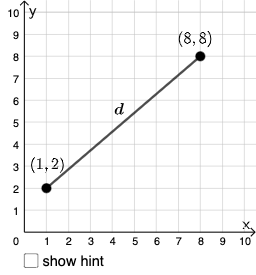
Open Middle: Distance in the Coordinate Plane
This example demonstrates probability distribution phenomena through an interactive histogram. It involves core math concepts like probability & statistics, angle calculations, and properties of equilateral triangles. Construction highlights include commands like PointIn, Segment, SurdText, Textfield, Point, If, Mode, Intersect, Polygon, Angle in GeoGebra. Suitable for high school mathematics teaching, focusing on probability statistics and geometric applications.
GeoGebra Commands & Parameters
PointIn(e) → APointIn(e) → BSegment(A, B) → fSurdText(f) → text1Textfield(j) → InputBox1Textfield(k) → InputBox2Point(Circle[A, sqrt((10 * j) + k)]) → CSegment(A, C) → lIf(m < i, "Too short!", m > i, "Too long!", "This value is correct!") → text7Mode(l1) → l2If(Length[l2] ≟ 0, "No digits repeat!", "Repeated digits exist.") → text8Intersect(eq1, p) → DPolygon(A, D, B) → t1, b_1, a_1, d_1Segment(A, D) → qSegment(D, B) → rAngle(B, D, A) → α
AI Drawing Prompt Reference
Create a plane diagram based on a circle: place two points A and B on the circle and draw the chord AB, with a length-related label text along that segment. Next construct a third point C on the circle so that the radius from the circle’s center equals a square-root expression formed from two user inputs (j and k). Draw segment AC. Then determine a point D from the intersection of an object tied to the construction (such as a line/circle defined earlier) and use points A, D, B to form a triangular polygon. Finally mark the angle at D, namely ∠BDA, and include a small text display that communicates whether the digit property for the involved length inputs holds, for a probability- and geometry-teaching demonstration.
The prompt above was compiled from the original drawing commands and is for reference only.