
Hexagon with Parallel Opposite Sides
Loading the math board and drawing, please wait…
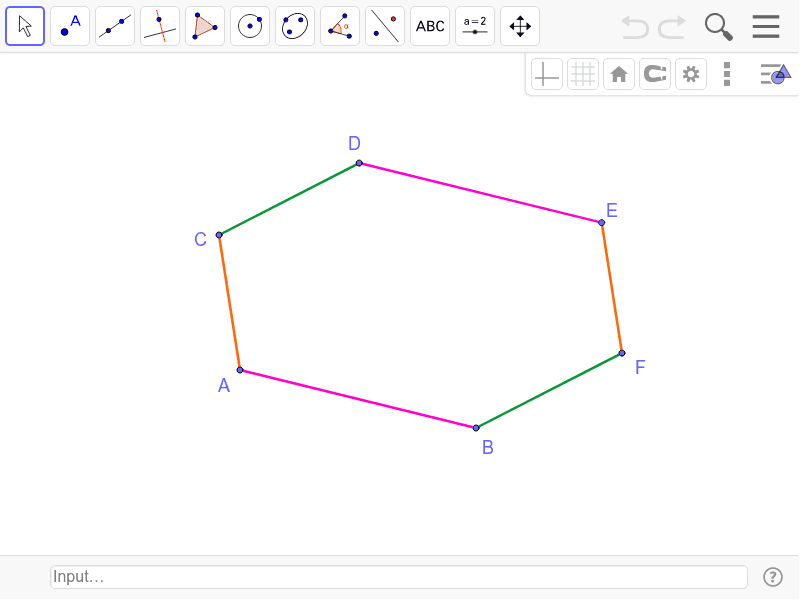
This example demonstrates the property of parallel opposite sides in a hexagon. Key mathematical concepts include polygon properties and geometric construction. Using GeoGebra commands such as Segment, Line, Point, and Intersect, a hexagon with parallel opposite sides can be constructed. Suitable for middle school and above students or teachers to understand polygon properties and construction techniques.
GeoGebra Commands & Parameters
Segment(A, B) → aLine(D, a) → bPoint(b) → ESegment(D, C) → cSegment(C, A) → dSegment(D, E) → eLine(E, d) → fLine(B, c) → gIntersect(f, g) → FSegment(E, F) → hSegment(B, F) → i
AI Drawing Prompt Reference
Draw a hexagon with opposite sides parallel. Start with a base segment. Choose a point above it and draw a line through that point parallel to the base. Pick a point on this parallel line as a vertex. Connect this vertex to the left endpoint of the base, and also connect the left endpoint to the right endpoint of the base. Then, from the upper vertex, draw a line parallel to the segment connecting the left and right base endpoints. From the right base endpoint, draw a line parallel to the segment connecting the left base endpoint and the upper vertex. These two lines intersect at a point. Connect this intersection point to the upper vertex and to the right base endpoint. The resulting six-sided figure has two pairs of opposite sides parallel.
The prompt above was compiled from the original drawing commands and is for reference only.