
Hemisphere Geometry and Calculus Application
Loading the math board and drawing, please wait…
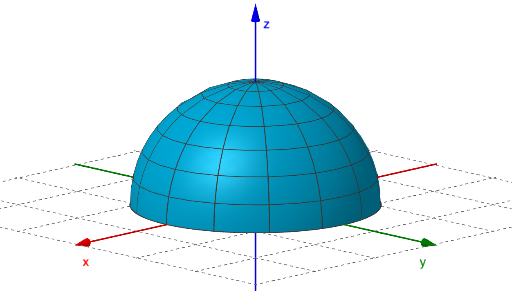
This example demonstrates the construction of a hemisphere and its applications in calculus. Key mathematical concepts include surface area calculation, volume integration, and the use of complex numbers in geometric representation. Construction involves GeoGebra commands such as Surface, objects button1, a, op, sph2, A, cone. Suitable for high school students or college undergraduates learning solid geometry and calculus fundamentals.
GeoGebra Commands & Parameters
Surface(((a * cos((π * u))) * sin(v)), ((a * sin((π * u))) * sin(v)), (a * cos(v)), u, 0, π, v, 0, π / 2) → sph2Surface(((3 * cos(u)) * sin(v / 2)), ((3 * sin(u)) * sin(v / 2)), 0, u, 0, (2 * π), v, 0, (2 * π)) → cone
AI Drawing Prompt Reference
Create a 3D geometric scene centered on a hemisphere: first generate a hemisphere surface with radius a using parameters u from 0 to π and v from 0 to π/2, so the points form the curved half-spherical shape. Then add a cone surface in the same coordinate space, using the same parameter style with u spanning 0 to 2π and v spanning 0 to 2π, and with the cone scaled by the constant 3. Display both surfaces together in a 3D view to compare their shapes and how they relate spatially.
The prompt above was compiled from the original drawing commands and is for reference only.