
Half Cylinder Surface
Loading the math board and drawing, please wait…
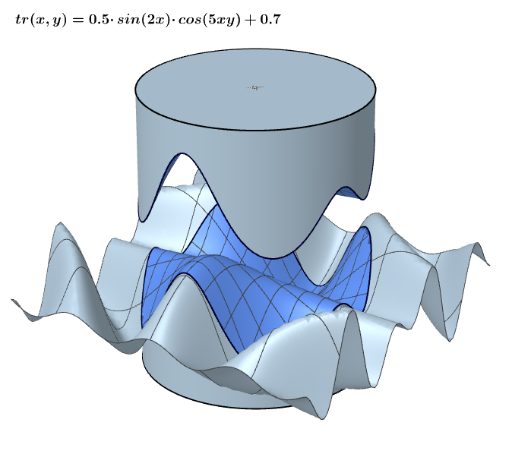
This example demonstrates the geometric construction of a half cylinder surface. Key mathematical concepts include the surface area and volume of a cylinder and a sphere. Using GeoGebra commands such as Surface, Rotate, and Mirror, the generation process of the half cylinder surface can be visually illustrated. Suitable for high school mathematics education and learning.
GeoGebra Commands & Parameters
Segment((0, 0, 1.44), (0, 0, 2.5)) → sSurface((u * cos(v)), (u * sin(v)), 0, u, 0, 1, v, 0, (2 * pi)) → cCurveCartesian(cos(u), sin(u), 0, u, 0, (2 * pi)) → dCurveCartesian(cos(u), sin(u), a(cos(u), sin(u)), u, 0, (2 * pi)) → eSurface((u * d(t)) + ((1 - u) * e(t)), u, 0, 1, t, 0, (2 * pi)) → fCircle((0, 0), 1, zAxis) → gSurface(u, v, a(u, v), u, -1, 1, v, -1, 1) → bMidpoint(A, C) → DOrthogonalPlane(D, zAxis) → pRotate(Mirror[b, p], pi, zAxis) → b'Mirror(c, p) → c'Mirror(d, p) → d'Rotate(Mirror[e, p], pi, zAxis) → e'Rotate(Mirror[f, p], pi, zAxis) → f'
AI Drawing Prompt Reference
Draw a half cylinder surface to demonstrate its geometric construction. Start by creating a vertical line segment and then generate a cylindrical surface. Next, form a circle and rotate it to create a curved surface. Mirror this surface at the midpoint of the vertical line and rotate it to obtain the half cylinder. Finally, perform mirror and rotation operations on the cylinder and curved surface to complete the half cylinder surface.
The prompt above was compiled from the original drawing commands and is for reference only.