
Group 7 Geometric Pattern: Rotation Construction & Congruence
Loading the math board and drawing, please wait…
In collections
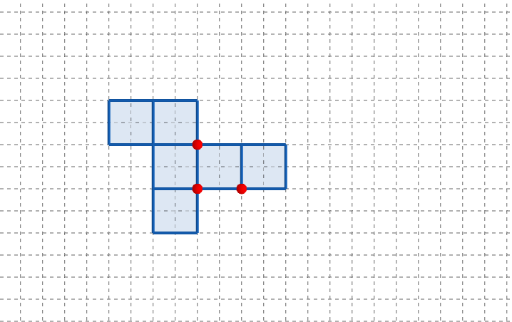
長方體有多少個摺紙圖樣?
This example demonstrates how to build a set of symmetric geometric patterns using rotational transformation, revealing congruence relationships between the generated shapes. The key mathematical ideas are rotation as a geometric transformation (Rotate), symmetry and congruence (congruence), and the structural role of vertices and control points (e.g., A, B, C and additional labeled points). Construction highlights: it uses GeoGebra commands Point to create the key points (A, B, C and multiple control points such as q1, q2… including corresponding marked points like q2’, q3’, etc.), Polygon to connect those points into the visible polygonal outlines (with shape/size parameters such as l, w, h reflected through the configuration), and Rotate to repeatedly generate the rotated copies using rotation center/angle parameters. Interactive elements driven by parameters like t (and t’) together with button controls (button1, button2) support stepwise or animated formation of the pattern, emphasizing the correspondence before/after rotation. Suitable for middle-school geometry, transformation practice, and classroom investigations on why rotations preserve distances and hence congruence.
GeoGebra Commands & Parameters
Point(Ray[(1, 0), (3, 0)]) → APoint(Ray[A + (1, 0), A + (2, 0)]) → CPoint(Ray[A + (0, 1), A + (0, 2)]) → BPolygon({(0, 0), A, B, (0, y(B))}) → q1Polygon({A, C, (x(C), y(B)), B}) → q2Polygon({(0, 0), A, A - (0, h), (0, (-h))}) → q3Polygon({B, B + (0, h), B + ((-l), h), B + ((-l), 0)}) → q4Polygon({C, C + (l, 0), C + (l, w), C + (0, w)}) → q5Polygon({(0, w), (0, w + h), ((-w), w + h), ((-w), w)}) → q6Rotate(q4, (90° * t), Line[(0, w), B]) → q4'Rotate(q3, (90° * t), Line[A, (0, 0)]) → q3'Rotate(q2, (90° * t), Line[B, A]) → q2'Rotate(Rotate[q5, (90° * t), Line[C + (0, w), C]], (90° * t), Line[B, A]) → q5'Rotate(Rotate[q6, (90° * t), Line[(0, w), (0, w + h)]], (90° * t), Line[(0, w), B]) → q6'
AI Drawing Prompt Reference
Create a symmetrical geometric pattern composed of several rectangles and squares. First, establish three reference points in the coordinate system and draw connected polygons using them as vertices to form the basic framework. Then rotate these polygons by 90-degree increments to generate four corresponding rotated copies, creating a complete rotational symmetry pattern. The overall design demonstrates rotational invariance (congruence after rotation), reflecting the relationships of symmetry and congruence in geometric transformations. Use parameter t to control rotation angles and parameters l, w, h to control proportions of different sections. The graphic should clearly show the correspondence before and after rotation along with congruence properties.
The prompt above was compiled from the original drawing commands and is for reference only.