
Graphing Composition with Absolute Value Exploration
Loading the math board and drawing, please wait…
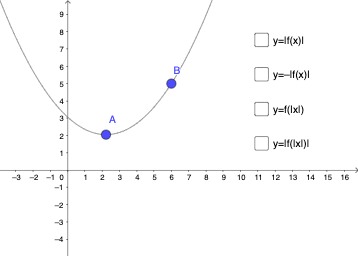
This example demonstrates how to graph the composition of absolute value functions using GeoGebra and observe the transformation patterns. Core math concepts include functions, absolute value functions, similarity transformations, and optimization problems. Key construction elements involve using GeoGebra commands for objects A, B, f, g, h, p, q, a, b, c, d, and slider animations to show variations in function compositions, suitable for high school mathematics teaching and function graphing studies.
GeoGebra Commands & Parameters
Point A(2.2191061936397296, 2.047651506203855)Point B(6, 5)f(x) = ((y(B) - y(A)) / (x(B) - x(A))^(2) * (x - x(A))^(2)) + y(A)g(x) = abs(f(x))h(x) = (-abs(f(x)))p(x) = f(abs(x))q(x) = abs(f(abs(x)))Boolean a(false)Boolean b(false)Boolean c(false)Boolean d(false)
AI Drawing Prompt Reference
Draw a composition of absolute value functions, including the function f(x), its absolute value g(x), and the negative absolute value h(x), as well as the graphs of p(x) = f(abs(x)) and q(x) = abs(f(abs(x))). Start by creating points A and B, then calculate f(x) based on the coordinates of A and B, and plot f(x), g(x), and h(x). Finally, plot p(x) and q(x).
The prompt above was compiled from the original drawing commands and is for reference only.