
Graphing Circles in the Coordinate Plane
Loading the math board and drawing, please wait…
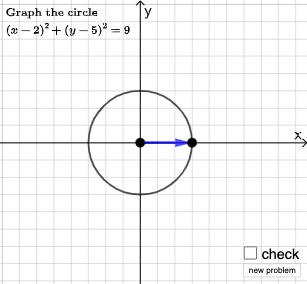
This example demonstrates the process of graphing circles in the Cartesian coordinate plane. It involves core mathematical concepts such as the standard equation of a circle, coordinate geometry, and the distance formula. Key GeoGebra commands and objects used include Point, Line, Vector, Polygon, Segment, Circle, Distance, Intersect, Angle, RotateText, Random, and If. It is suitable for high school students learning about the geometric properties and algebraic representation of circles.
GeoGebra Commands & Parameters
Point(Segment[(h + 1, y(C) + 10), (h + 1, y(C) - 10)]) → DLine(A, B) → fVector(A, C) → uPolygon(A, C, B) → t1, b, a_1, cSegment(A, C) → h_{1}Vector((h, 0), A) → wVector((0, 0), (h, 0)) → jPoint(Ray[A + (1, 0), A + (2, 0)]) → ECircle(A, E) → pDistance(A, E) → nVector(A, E) → vPoint(p) → FIntersect(eq1, q) → GPolygon(A, G, F) → t2, f_1, a_2, g_1Segment(F, A) → rSegment(A, G) → sSegment(G, F) → tAngle(A, G, F) → αRotateText(text18, pi / 2) → text20RotateText(text19, pi / 2) → text21Random(-5, 5) → xcRandom(-5, 5) → ycRandom(1, 7) → n_1If(A ≟ Center[eq2], "Center is correct.", "Center is not correct.") → text2If(Distance[A, E] ≟ Radius[eq2], "Radius is correct.", "Radius is not correct.") → text3
AI Drawing Prompt Reference
Draw a circle in the coordinate plane with center at point A and passing through point E. Construct a ray from A horizontally and place E on it. Choose another point F on the circle)Skip, and let G be an intersection of the circle with a given line. Connect A, F, and G to form a triangle, and mark its angle at G. Also draw a line through A and B, a vector from A to C, and a polygon with vertices A, C, and B. Show two random points as references for the center and radius, and display text indicating whether the center and radius are correct.
The prompt above was compiled from the original drawing commands and is for reference only.