
Gradient and Y Intercept of Straight Line & its Equation
Loading the math board and drawing, please wait…
In collections
Introduction to Linear Functions and Graphs
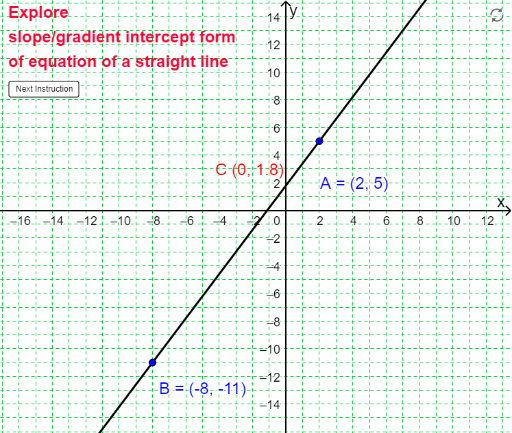
This example demonstrates how to set up different straight lines using GeoGebra and internalize the relationship between slope and y-intercept. Core math concepts include line slope, y-intercept, and equation representation. Construction involves commands like Line, Slope, Intersect, Point, Segment, Midpoint. Suitable for middle school and above students for coordinate geometry learning and practice.
GeoGebra Commands & Parameters
Line(A, B) → aSlope(a) → mIntersect(a, yAxis) → CIf(x(A) ≟ x(B), "yes", "no") → verticalinePoint(f) → DPoint(f) → ELine(E, xAxis) → bLine(D, yAxis) → dIntersect(d, b) → FSegment(E, F) → eSegment(F, D) → gLine(D, xAxis) → hLine(E, yAxis) → iIntersect(h, i) → GSegment(G, D) → jSegment(G, E) → kAngle(E, F, D) → αMidpoint(g) → M_{DF}Midpoint(e) → M_{EF}Midpoint(k) → M_{GE}Midpoint(j) → M_{GD}Angle(D, G, E) → βPolygon(D, E, F) → poly1, f_1, d_1, e_1Polygon(D, E, G) → poly2, g_1, d_2, e_2
AI Drawing Prompt Reference
Draw a straight line and display its slope and y-intercept, highlighting the slope and intercept segments in different colors. Add two auxiliary lines intersecting the x-axis and y-axis, and mark their intersection points. Connect these points to form two polygons, labeling the midpoints of key segments. Indicate the angles between the segments with arrows to clearly show the relationship between the line's equation, slope, and y-intercept.
The prompt above was compiled from the original drawing commands and is for reference only.