
GoGeometry Action 169: Dynamic Regular Pentagon Geometry Construction
Loading the math board and drawing, please wait…
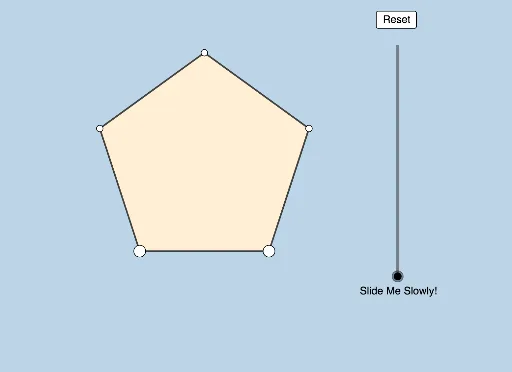
This example illustrates a dynamic geometry problem involving a regular pentagon from GoGeometry. Key concepts include circumcircles, geometric transformations, and trigonometric relationships. Construction utilizes GeoGebra commands such as Polygon, Circle, Rotate, Intersect, and Vector to create an interactive model. Ideal for high school students and math enthusiasts exploring Euclidean geometry properties and visualizing complex geometric relationships through dynamic manipulation.
GeoGebra Commands & Parameters
Polygon(A, B, 5) → poly1, f, g, h, i, j, C, D, ESegment(A, B) → kSegment(B, C) → lSegment(C, D) → mSegment(D, E) → nSegment(E, A) → pCircle(E, D, C) → cCenter(c) → FRotate(A, If[0 < a ≤ 1, ((a * 2) * π / 5), (2 * π / 5)], F) → A'Rotate(B, If[0 < a ≤ 1, ((a * 2) * π / 5), (2 * π / 5)], F) → B'Segment(A', B') → k'Rotate(B, If[0 < a ≤ 1, ((a * 2) * π / 5), (2 * π / 5)], F) → B'_1Rotate(C, If[0 < a ≤ 1, ((a * 2) * π / 5), (2 * π / 5)], F) → C'Segment(B'_1, C') → l'Rotate(C, If[0 < a ≤ 1, ((a * 2) * π / 5), (2 * π / 5)], F) → C'_1Rotate(D, If[0 < a ≤ 1, ((a * 2) * π / 5), (2 * π / 5)], F) → D'Segment(C'_1, D') → m'Rotate(D, If[0 < a ≤ 1, ((a * 2) * π / 5), (2 * π / 5)], F) → D'_1Rotate(E, If[0 < a ≤ 1, ((a * 2) * π / 5), (2 * π / 5)], F) → E'Segment(D'_1, E') → n'Rotate(E, If[0 < a ≤ 1, ((a * 2) * π / 5), (2 * π / 5)], F) → E'_1Rotate(A, If[0 < a ≤ 1, ((a * 2) * π / 5), (2 * π / 5)], F) → A'_1Segment(E'_1, A'_1) → p'Rotate(D, If[2 < a ≤ 4, ((a - 2) * π), (2 * π)], F) → D'_2CircleArc(F, D, D'_2) → dCircleArc(F, D, E) → eCircleArc(F, E, D) → qPoint(e) → GDilate(G, If[4 < a ≤ 5, 5 - a, 0], E) → G'Dilate(G, If[5 < a ≤ 6, 6 - a, 0], A) → G'_1Dilate(G, If[6 < a ≤ 7, 7 - a, 0], B) → G'_2Dilate(G, If[7 < a ≤ 8, 8 - a, 0], C) → G'_3Dilate(G, If[8 < a ≤ 9, 9 - a, 0], D) → G'_4Segment(G, G') → rSegment(G, G'_1) → sSegment(G, G'_2) → tSegment(G, G'_3) → bSegment(G, G'_4) → f_1Line(G, B) → g_1Point(g_1) → HRotate(G, If[10 < a ≤ 11, (((-(a - 10)) * 3) * π / 5), (-3 * π / 5)], G) → G'_5Rotate(G', If[10 < a ≤ 11, (((-(a - 10)) * 3) * π / 5), (-3 * π / 5)], G) → G''Segment(G'_5, G'') → r'Dilate(G, If[11 < a ≤ 12, 12 - a, 0], B) → G'_6Vector(G, G'_6) → vTranslate(G, v) → G'_7Translate(G'_4, v) → ISegment(G'_7, I) → h_1Rotate(G'_7, If[12 < a ≤ 13, (((-(a - 12)) * 2) * π / 5), (-2 * π / 5)], B) → JRotate(I, If[12 < a ≤ 13, (((-(a - 12)) * 2) * π / 5), (-2 * π / 5)], B) → I'Segment(J, I') → i_1OrthogonalLine(G'', t) → j_1OrthogonalLine(I', i_1) → k_1Point(j_1) → KOrthogonalLine(K, j_1) → l_1Intersect(l_1, k_1) → LCircle(K, s) → c_1Intersect(c_1, l_1, 1) → MDilate(G'', If[14 < a ≤ 15, 15 - a, 0], K) → G'''Segment(G'', G''') → m_1Angle(L, K, G'') → αAngle(K, G'', G) → βDilate(K, If[15 < a ≤ 16, 16 - a, 0], M) → K'Segment(K, K') → n_1Vector(K, K') → wTranslate(G'', w) → G'''_1Translate(G''', w) → NSegment(G'''_1, N) → p_1Dilate(M, If[16 < a ≤ 17, 17 - a, 0], L) → M'Vector(M, M') → u_1Translate(G'''_1, u_1) → OTranslate(N, u_1) → N'Segment(O, N') → q_1Segment(K', M') → r_1Angle(I', L, K) → γDilate(G, If[18 < a ≤ 19, 19 - a, 0], K) → G'_8Vector(G, G'_8) → v_1Translate(G, v_1) → G'_9Translate(G'_1, v_1) → PSegment(G'_9, P) → s'Rotate(G'_9, If[18 < a ≤ 19, ((a - 18) * π / 5), π / 5], G'_9) → QRotate(G'_9, If[18 < a ≤ 19, ((a - 18) * π / 5), π / 5], Q) → RRotate(P, If[18 < a ≤ 19, ((a - 18) * π / 5), π / 5], Q) → P'Segment(R, P') → s''Semicircle(G, K') → d_1Center(d_1) → SRotate(G, If[19 < a ≤ 20, ((-(a - 19)) * π), (-π)], S) → G'_{10}Vector(G, G'_{10}) → w_1Translate(G, w_1) → G'_{11}Translate(G'_3, w_1) → TSegment(G'_{11}, T) → b'Rotate(G'_{11}, If[19 < a ≤ 20, ((-(a - 19)) * π / 5), ((-π)) / 5], G'_{11}) → URotate(T, If[19 < a ≤ 20, ((-(a - 19)) * π / 5), ((-π)) / 5], G'_{11}) → T'Segment(U, T') → b''Segment(G, A) → s_1Segment(G, C) → t_1
AI Drawing Prompt Reference
Draw a regular pentagon with its circumcircle. Rotate the entire pentagon about the circle's center by a dynamic angle from 0 to 72 degrees, creating a second pentagon, and connect corresponding vertices to show the rotated edges. Place a moving point on the circumcircle, then draw segments from this point to each vertex of the original pentagon, with these segments dynamically scaling as the point moves. Using the moving point as a pivot, rotate the point and one of its associated points by a dynamic negative angle to form a rotated segment. Finally, translate the moving point along a vector from one original vertex toward the point, and connect the original and translated positions to show a translated segment. The figure illustrates dynamic transformations of a regular pentagon under rotation, scaling, and translation.
The prompt above was compiled from the original drawing commands and is for reference only.