
GoGeometry Action 134!
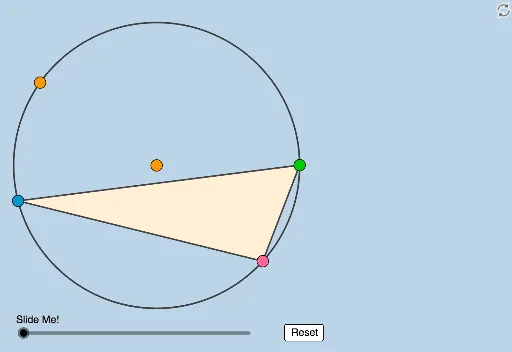
Loading the math board and drawing, please wait…
GeoGebra Commands & Parameters
Circle(O, B_2) → cPoint(c) → APoint(c) → BLine(A, B) → lPoint(c) → CCircle(C, 3) → eLine(O, C) → fOrthogonalLine(C, f) → gIntersect(e, g, 2) → DRay(C, D) → hIntersect(l, h) → FDilate(F, If[1 < a ≤ 2, 2 - a, 0], C) → F'Circle(F, C) → pPoint(p) → PAngle(C, F, P) → βCircle(C, O) → dPolygon(C, B, A) → t1, g_1, c_1, f_1Segment(A, B) → iSegment(B, C) → jSegment(C, A) → kLine(A, P) → mLine(B, P) → nLine(C, P) → qIntersect(c, n, 2) → B_1Intersect(c, m, 2) → A_1Intersect(c, q) → E, C_1Distance(B_1, C_1) → distanceB1C1Distance(C_1, A_1) → distanceC1A1Dilate(B, If[0 < a ≤ 1, 1 - a, 0], F) → B'Segment(B, B') → rDilate(O, If[1 < a ≤ 2, 2 - a, 0], C) → O'Segment(O, O') → sSegment(F, F') → tAngle(F, C, O) → αRotate(C, If[2 < a ≤ 4, ((a - 2) * π), (2 * π)], F) → C'Rotate(F, If[2 < a ≤ 4, ((a - 2) * π), (2 * π)], F) → F'_1Rotate(C, If[2 < a ≤ 4, ((a - 2) * β / 2), β], F) → C'_1Segment(F, C'_1) → bCircleArc(F, C, C'_1) → d_1Rotate(P, If[4 < a ≤ 5, ((a - 4) * ((2 * π) - β)), (2 * π) - β], F) → P'Segment(F, P') → h_1CircleArc(F, P, P') → e_1Dilate(A, If[5 < a ≤ 6, 6 - a, 0], P) → A'Segment(A, A') → i_1Dilate(P, If[6 < a ≤ 7, 7 - a, 0], A_1) → P'_1Segment(P, P'_1) → j_1Dilate(B, If[7 < a ≤ 8, 8 - a, 0], P) → B'_1Segment(B, B'_1) → k_1Dilate(P, If[8 < a ≤ 9, 9 - a, 0], B_1) → P'_2Segment(P, P'_2) → l_1Dilate(C, If[9 < a ≤ 10, 10 - a, 0], P) → C'_2Segment(C, C'_2) → m_1Dilate(P, If[10 < a ≤ 11, 11 - a, 0], C_1) → P'_3Segment(P, P'_3) → n_1Angle(B_1, C_1, A_1) → γDilate(B_1, If[12 < a ≤ 13, 13 - a, 0], C_1) → GSegment(B_1, G) → p_1Dilate(A_1, If[13 < a ≤ 14, 14 - a, 0], C_1) → HSegment(A_1, H) → q_1Rotate(A_1, If[15 < a ≤ 16, ((-(a - 15)) * γ), (-γ)], C_1) → IRotate(H, If[15 < a ≤ 16, ((-(a - 15)) * γ), (-γ)], C_1) → H'Segment(I, H') → r_1
AI Drawing Prompt Reference
Draw a circle with three points on it forming a triangle. From the center, draw a perpendicular to one vertex, intersecting a circle centered at that vertex with radius 3, then extend a ray to meet the opposite side. Based on a parameter, dilate or rotate this intersection point dynamically. Connect each triangle vertex to a point on the circle, intersecting the circle again to create new points, and measure distances between them. Then, for different parameter ranges, dilate or rotate several points, drawing segments and arcs to illustrate geometric sequences and ratios.
The prompt above was compiled from the original drawing commands and is for reference only.