
Geometric Construction for a Calendar Puzzle
Loading the math board and drawing, please wait…
In collections
GeoGebra and Laser Cutting
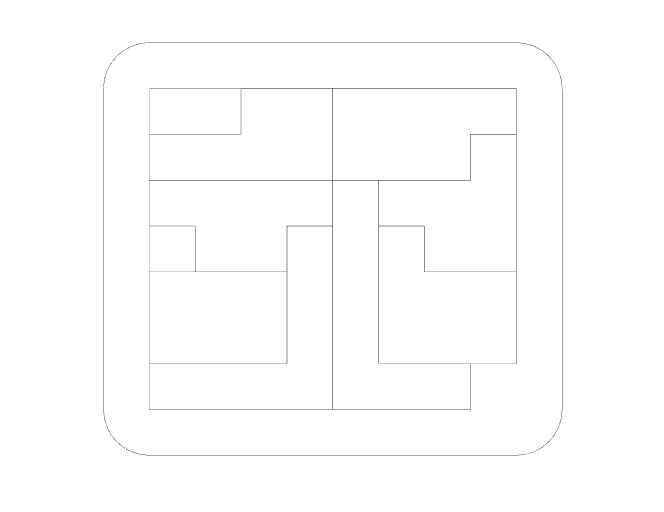
This example demonstrates a “calendar puzzle” using a planar geometric layout, showing how intersection and symmetry constraints can encode number/date rules. The core mathematics combines logical reasoning with relationships among natural numbers and rational numbers (e.g., ratio-like constraints), realized through classical Euclidean constructions. The build is driven by GeoGebra commands and constructed objects: Intersect to obtain key intersection points, Point to define construction points, Segment and Polygon to form the assembled polygonal regions (poly1, poly2), CircleArc to create curved boundary arcs, OrthogonalLine to enforce perpendicular constraints, and Mirror to impose reflection symmetry. Sequence is used to generate structured sets of points/segments following a rule (e.g., l1–l6 and related marked elements), while intermediate objects such as q1, a–d, E–N and others represent auxiliary quantities that connect the logical conditions to the geometry. Suitable for secondary school geometry, inquiry-based learning, and early contest training, especially for students learning to translate a puzzle’s logic into geometric constraints in GeoGebra.
GeoGebra Commands & Parameters
Intersect(xAxis, yAxis) → APoint(xAxis) → BPoint(yAxis) → DPolygon(A, B, C, D) → q1, a, b, c, dSequence(Point[a, i / 8], i, 1, 7) → l1Sequence(Point[c, i / 8], i, 1, 7) → l2Sequence(Point[b, i / 7], i, 1, 6) → l3Sequence(Point[d, i / 7], i, 1, 6) → l4Sequence(Segment[l1(i), l2(8 - i)], i, 1, 7) → l5Sequence(Segment[l3(i), l4(7 - i)], i, 1, 7) → l6Point(l6) → EPoint(c) → FPoint(l6) → GPoint(d) → HPoint(d) → IPoint(l6) → JPoint(c) → KPolygon(F, G, H, I, J, K) → poly1, f, g, h, i, j, kIntersect(b, c) → LPoint(b) → MPoint(l6) → NPoint(l6) → OPolygon(K, L, M, N, O, J) → poly2, k_1, l, m, n, o, j_1Point(l5) → PPoint(l6) → QPoint(l6) → RPoint(l6) → SPoint(b) → TPolygon(P, Q, R, S, T, M, N, O) → poly3, p, q, r, s, t, m_1, n_1, o_1Point(l6) → UPoint(b) → VPolygon(Q, U, V, T, S, R) → poly4, q_1, u, v, t_1, s_1, r_1Point(u) → WPoint(a) → ZPoint(a) → A_1Polygon(J, P, U, W, Z, A_1) → poly5, j_2, p_1, u_1, w, z_1, a_1Point(d) → B_1Point(l6) → C_1Point(l6) → D_1Point(l6) → E_1Point(l6) → F_1Point(a_1) → G_1Polygon(I, B_1, C_1, D_1, E_1, F_1, G_1, J) → poly6, i_1, b_1, c_1, d_1, e_1, f_1, g_1, j_3Point(l6) → H_1Point(d) → I_1Intersect(a, d) → J_1Polygon(F_1, H_1, I_1, J_1, A_1, G_1) → poly7, e, h_1, l_1, f_2, g_2, h_2Point(d) → K_1Polygon(K_1, E_1, H_1, I_1) → q2, i_2, k_2, l_2, m_2Segment(L_1, M_1) → n_2Segment(N_1, O_1) → p_2Segment(P_1, Q_1) → q_2Segment(R_1, S_1) → r_2Intersect(c, d) → T_1CircleArc(T_1, L_1, R_1) → c_2Point(d) → U_1CircleArc(U_1, S_1, P_1) → d_2Intersect(a, b) → V_1CircleArc(V_1, Q_1, O_1) → e_2Intersect(b, c) → W_1CircleArc(W_1, N_1, M_1) → s_2Point(yAxis) → Z_1OrthogonalLine(Z_1, yAxis) → t_2Mirror(C, t_2) → C'Mirror(D, t_2) → D'Mirror(D, t_2) → D'_{1}Mirror(A, t_2) → A'Mirror(B, b) → B'Mirror(A, t_2) → A'_{2}Mirror(C, t_2) → C'_{1}Mirror(B, t_2) → B'_{1}Mirror(C, t_2) → C'_{2}Mirror(A, t_2) → A'_{1}Mirror(B, t_2) → B'_{2}Mirror(L_1, t_2) → A_2Mirror(M_1, t_2) → B_2Mirror(P_1, t_2) → C_2Mirror(Q_1, t_2) → D_2Mirror(R_1, t_2) → E_2Mirror(S_1, t_2) → F_2Mirror(N_1, t_2) → G_2Mirror(O_1, t_2) → H_2Mirror(l6, t_2) → l6'
AI Drawing Prompt Reference
Draw a geometric layout composed of multiple polygons and circular arcs to demonstrate the encoding of date rules. Start by constructing a rectangle and generate several sets of points inside it following specific rules, connecting these points to form line segments. Use the intersections of these segments with the rectangle's boundaries to create two main polygonal regions, adding circular arcs as curved boundaries. Enforce symmetry using perpendicular lines and reflection operations. Finally, connect certain points and segments according to specific rules to form additional polygonal regions, making the layout more intricate and logical.
The prompt above was compiled from the original drawing commands and is for reference only.