
Goat Clipper (Hyperclassic Problem): Constructing an Optimal Path via Circle/Con
Loading the math board and drawing, please wait…
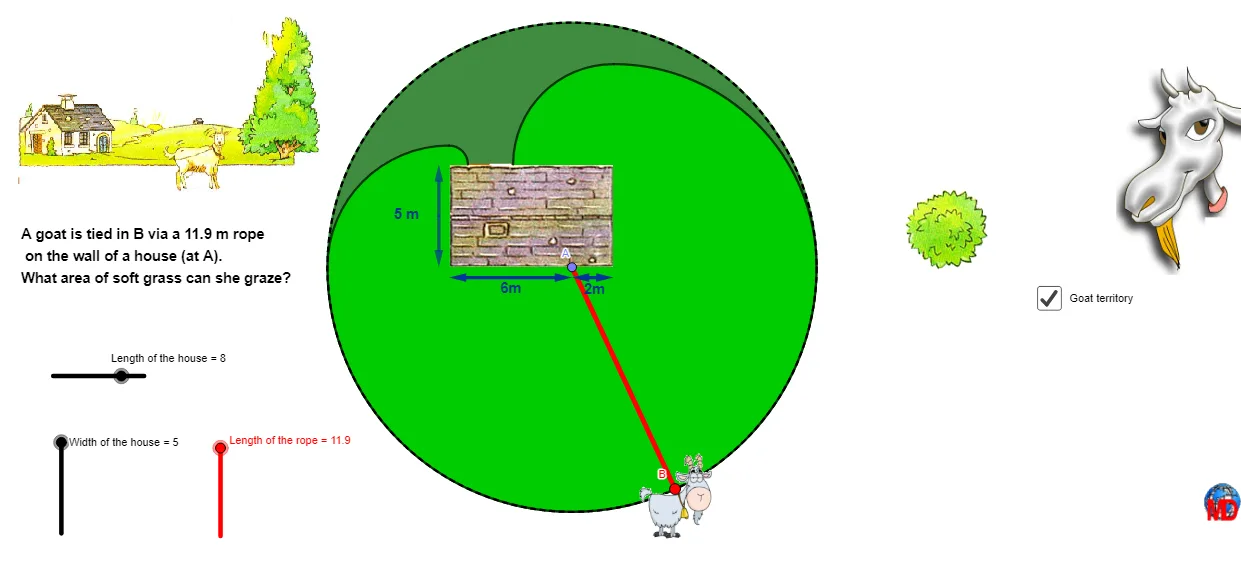
This GeoGebra example demonstrates how the “Goat Clipper” hyperclassic problem can be visualized and solved through synthetic geometry construction in the plane. It shows how, given walls/constraints and key points, one can determine the crucial optimal connecting path by exploiting the geometric locus behind a difference-and-distance condition—often linked to conic behavior such as a hyperbola-type “difference of distances” property. The core concepts include circle and arc geometry, angles, vectors, distance measurements, and transformations (mirror/rotation) that convert the constrained problem into an equivalent construction. In the construction process, it uses Segment and Point to define the geometric skeleton; Circle, CircleArc, and CircleSector to create the required circles and arcs; Midpoint and LineBisector for symmetry and angle-bisector structures; Mirror and Rotate to generate transformed copies and Intersect to compute key intersection points; Angle, Ray, Distance, and Vector to measure direction/angles and compute required distance relations; Root, If, and Sum for selecting or computing the relevant solution components; and Polygon/Arc to present the final feasible region or critical curve segment clearly. Suitable for advanced high-school contest preparation and for instructional demonstrations in geometry construction and conic-locus reasoning.
GeoGebra Commands & Parameters
Segment(G, R) → grPoint(gr) → ACircleSector(G, L_21, L_11) → zone3CircleSector(E, L_31, L_21) → zone5CircleSector(A, L_11, L_12) → zone1CircleSector(R, L_12, L_22) → zone2Midpoint(L_31, L_32) → L_4CircleSector(D, L_22, L_4) → zone4Point(l1) → BSegment(G, A) → gaIf(y(B) ≤ y(R), 1, 0) → A1If(y(B) > y(R) ∧ x(B) ≥ x(R), 2, 0) → A2If(y(B) ≥ y(D) ∧ x(B) < x(D) ∧ x(B) > x(L_4), 4, 0) → A4If(y(B) ≥ y(E) ∧ x(B) > x(E) ∧ x(B) < x(L_4), 5, 0) → A5If(y(B) > y(R) ∧ x(B) ≤ x(G), 3, 0) → A3Sum(A1:A5) → A7Object("B" + A7) → B7Object("C" + A7) → C7Midpoint(B_{2}, B) → FSegment(B_{2}, F) → bfRoot(f, -1.5, 1.5) → HRotate(B, x(H), B_{2}) → C'Angle(B, B_{2}, C') → δLineBisector(bf) → aRay(B_{2}, C') → bIntersect(a, b) → ICircleArc(I, B_{2}, F) → cMirror(I, F) → I'Mirror(B_{2}, F) → B'Mirror(F, F) → F'Arc(Mirror[Circle[I, B_{2}], F], B', F') → c'Segment(A, G) → agSegment(E, G) → egSegment(A, R) → arSegment(R, D) → rdRay(B_{2}, B) → dCircle(B_{2}, C7) → eIntersect(e, d) → K,Segment(B_{2}, K) → bkIf((2 * bf) ≥ C7, K, B) → JRotate(P, 320°, T) → P'Angle(P, T, P') → αSegment(T, P') → hPolygon(P, E, G, R, D) → poly1, p, e_1, g_1, r, d_1Segment(P, T) → iSegment(G, A) → jIf(4.45 < j ∧ j < 4.55 ∧ 10.45 < lc ∧ lc < 10.55, true, false) → bsSegment(E, G) → kSegment(E, P) → lSegment(T, D) → mSegment(D, R) → nSegment(P', T) → qSegment(G', R') → sSegment(R, R') → tSegment(G, G') → a_1Midpoint(G, R) → ZCircle(A, lc) → c_1CircleArc(A, L_11, L_12) → f_1CircleArc(R, L_12, L_22) → h_1CircleArc(G, L_21, L_11) → k_1CircleArc(D, L_22, L_4) → p_1CircleArc(E, L_31, L_21) → q_1Circle(A, lc) → r_1Segment(A, R) → i_1Angle(M, A, B) → βSegment(R, D) → j_1Segment(A, G) → l_1Segment(G, E) → m_1Distance(G, R) → disDistance(A, R) → disaDistance(A, G) → disbMidpoint(C, N) → D_1Midpoint(C, O) → E_1Vector(D_1, N) → uVector(D_1, C) → vVector(E_1, C) → wVector(E_1, O) → u_1Midpoint(G_1, F_1) → H_1Vector(H_1, G_1) → v_1Vector(H_1, F_1) → w_1
AI Drawing Prompt Reference
Create a planar diagram illustrating the “Goat Clipper” hyperclassic geometry construction. Start with given key points and draw the main connecting segments that represent walls/constraints. Build several circular sector regions using circles and arc segments centered at the specified points, forming overlapping feasible zones. Use a midpoint-derived line (such as a perpendicular/angle-bisector structure) together with a ray to compute a crucial intersection point. Construct a circular arc through that intersection and the midpoint, then generate corresponding elements by mirroring the point and the arc about the relevant center/line, along with a rotation to obtain the rotated counterpart. Combine the resulting rays, segments, and arcs into a final polygon/arc boundary that highlights the constrained, conic-locus–like path reasoning, including the key distances and an angle measurement showing the directional constraint.
The prompt above was compiled from the original drawing commands and is for reference only.