
Girih Pattern Puzzle: Interactive Exploration of Symmetry and Geometric Transfor
Loading the math board and drawing, please wait…
In collections
islamic geometric patterns
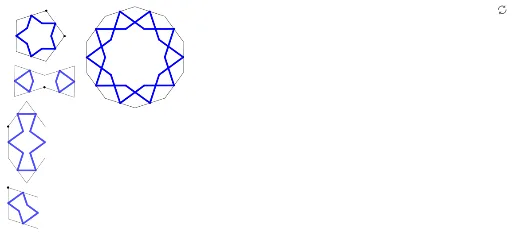
This GeoGebra example demonstrates a puzzle based on the traditional Islamic girih geometric pattern, constructed using commands such as Point, Polygon, Midpoint, Segment, Intersect, OrthogonalLine, Mirror, Centroid, Sequence, Rotate, Ray, and PolyLine. The core mathematical concepts involve geometric transformations (rotation and reflection), symmetry, polygon and centroid properties, and iterative pattern generation via sequences. The construction begins by defining base points A and B, creating the initial polygon veelhoek1, then progressively builds auxiliary lines, perpendiculars, and mirrored elements using Midpoint, Segment, Intersect, OrthogonalLine, Mirror, and Centroid. Finally, Sequence and Rotate generate repeated rotated motifs, while Ray and PolyLine complete the intricate tessellation. Numerous named objects (f through t, l1, veelhoek2, etc.) allow precise control over each geometric element. This example is suitable for upper secondary to early university students, helping them understand how transformations create symmetric designs, and serves as an excellent cross-disciplinary resource linking mathematics with art and cultural heritage.
GeoGebra Commands & Parameters
Point(Circle[A, 1]) → BPolygon(A, B, 10) → veelhoek1, f, p, C, D, E, F, G, H, I, J, g, h, i, j, k, l, m, nMidpoint(f) → KMidpoint(i) → LMidpoint(g) → MMidpoint(h) → OMidpoint(p) → PSegment(K, L) → qSegment(O, P) → rIntersect(q, r) → NOrthogonalLine(K, f) → sMirror(N, s) → N'Segment(N', K) → tSegment(K, N) → aCentroid(veelhoek1) → QSequence(Rotate[{a, t}, (nn * 36°), Q], nn, 1, 10) → l1Point(Circle[R, 1]) → SPolygon(R, S, 5) → veelhoek2, b, c, d, e, f_1, T, U, VMidpoint(b) → WRotate(S, 54°, W) → S'Midpoint(c) → ZRay(W, S') → g_1Rotate(S, (-(54°)), Z) → S'_1Ray(Z, S'_1) → h_1Intersect(g_1, h_1) → A_1Segment(W, A_1) → i_1Segment(A_1, Z) → j_1Centroid(veelhoek2) → B_1Sequence(Rotate[{i_1, j_1}, (nn * 72°), B_1], nn, 1, 5) → l2Point(Circle[C_1, 1]) → D_1Rotate(C_1, 144°, D_1) → E_1Rotate(D_1, 72°, C_1) → F_1Rotate(D_1, (-(72°)), E_1) → G_1Rotate(C_1, 72°, F_1) → H_1Polygon(F_1, C_1, D_1, E_1, G_1, H_1) → veelhoek3, k_1, c_1, d_1, e_1, l_1, m_1Midpoint(m_1) → I_1Midpoint(k_1) → J_1Midpoint(c_1) → K_1Midpoint(l_1) → L_1Midpoint(e_1) → M_1Midpoint(d_1) → N_1Segment(J_1, K_1) → n_1Rotate(J_1, (-(72°)), K_1) → O_1Rotate(K_1, (-(72°)), K_1) → P_1Segment(O_1, P_1) → p_1Segment(J_1, M_1) → q_1Intersect(p_1, q_1) → Q_1Segment(H_1, D_1) → r_1Mirror(Q_1, r_1) → R_1PolyLine(J_1, K_1, Q_1, I_1, J_1) → s_1Mirror(J_1, r_1) → S_1Mirror(K_1, r_1) → T_1Mirror(Q_1, r_1) → U_1Mirror(I_1, r_1) → V_1Mirror(J_1, r_1) → W_1PolyLine(S_1, T_1, U_1, V_1, W_1) → t_1Point(Circle[Z_1, 1]) → A_2Rotate(Z_1, 144°, A_2) → B_2Rotate(A_2, (-(144°)), Z_1) → C_2Segment(B_2, C_2) → a_1Mirror(A_2, a_1) → D_2Mirror(Z_1, a_1) → E_2Polygon(B_2, A_2, Z_1, C_2, E_2, D_2) → veelhoek4, b_2, a_2, z_1, c_2, e_2, d_2Midpoint(b_2) → F_2Midpoint(d_2) → G_2Midpoint(a_2) → H_2Midpoint(z_1) → I_2Rotate(A_2, 54°, F_2) → J_2Ray(F_2, J_2) → b_1Rotate(A_2, (-(54°)), H_2) → K_2Ray(H_2, K_2) → f_2Intersect(b_1, f_2) → L_2Mirror(L_2, a_1) → M_2Midpoint(e_2) → N_2Segment(H_2, N_2) → g_2Mirror(L_2, g_2) → O_2Mirror(M_2, g_2) → P_2Midpoint(c_2) → Q_2PolyLine(F_2, L_2, F_2, H_2, O_2, I_2, Q_2, P_2, N_2, M_2, G_2) → h_2Point(Circle[R_2, 1]) → S_2Rotate(R_2, 72°, S_2) → T_2Rotate(S_2, (-(108°)), R_2) → U_2Polygon(S_2, R_2, U_2, T_2) → vierhoek1, s_2, r_2, u_2, t_2Midpoint(s_2) → V_2Midpoint(t_2) → W_2Midpoint(u_2) → Z_2Midpoint(r_2) → A_3Rotate(W_2, (-(72°)), V_2) → B_3Ray(V_2, B_3) → i_2Segment(R_2, T_2) → j_2Mirror(B_3, j_2) → C_3Ray(A_3, C_3) → k_2Intersect(i_2, j_2) → D_3Segment(S_2, U_2) → l_2Mirror(D_3, l_2) → E_3PolyLine(V_2, D_3, A_3, Z_2, E_3, W_2, V_2) → m_2
AI Drawing Prompt Reference
Draw a puzzle based on the traditional Islamic Girih geometric pattern, showcasing symmetry and geometric transformations. Start by defining two base points and creating a decagon, then use midpoints, segments, intersections, perpendiculars, reflections, and centroids to construct auxiliary lines. Generate repeated rotated motifs using sequences and rotations, and complete the intricate tessellation with rays and polylines. The design should illustrate how geometric transformations create symmetric patterns.
The prompt above was compiled from the original drawing commands and is for reference only.