
Geometric Visualization of Multiplying Fractions Using Polygon Constructions
Loading the math board and drawing, please wait…
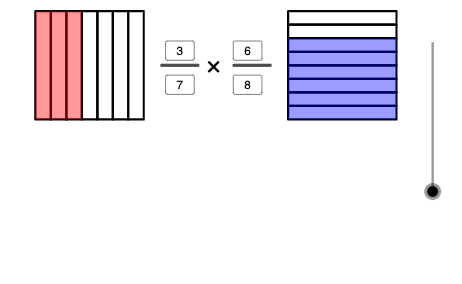
This example demonstrates how multiplying fractions can be visualized through geometric constructions—turning algebraic fraction products into observable proportional relationships within constructed shapes. It centers on fractions and rational numbers, proportion/ratio interpretation, and stepwise construction controlled by logic conditions. The construction is built using GeoGebra commands such as Polygon (to form and manage main polygonal regions like poly1/poly2), Point (to define key vertices and parameter-driven points), Segment (to draw boundaries and subdivision lines), Textfield (to label parameters and computed results), Sequence (to generate ordered points/objects indexed by parameters like n), and If (to decide how objects are created or connected under conditions). The object structure includes sequences of intermediate segments/points (e.g., multiple d* and n* objects) to support iterative fraction-based partitioning and clear labeling of the resulting product relationship. Suitable for middle-school to early high-school learners and for students practicing GeoGebra geometric construction of rational-number ideas.
GeoGebra Commands & Parameters
Polygon(A, B, 4) → poly1, f, g, h, i, C, DPolygon(E, F, 4) → poly2, j, k, l, m, G, HTextfield(d11) → d1Textfield(d22) → d2Textfield(n11) → n1Textfield(n22) → n2Sequence(H + (a / d11 * (G - H)), a, 0, d11) → l1Sequence(A + (a / d22 * (D - A)), a, 0, d22) → l2Sequence(E + (a / d11 * (F - E)), a, 0, d11) → l3Sequence(B + (a / d22 * (C - B)), a, 0, d22) → l4Sequence(Polygon[l1(a), l1(a + 1), l3(a + 1), l3(a)], a, 1, d11) → l5Sequence(Polygon[l2(a), l2(a + 1), l4(a + 1), l4(a)], a, 1, d22) → l6Sequence(Polygon[l1(a), l1(a + 1), l3(a + 1), l3(a)], a, 1, n11) → l7Sequence(Polygon[l2(a), l2(a + 1), l4(a + 1), l4(a)], a, 1, n22) → l8Point(yAxis) → OSegment(N, O) → pSegment(P, Q) → qPoint(yAxis) → IIf(0 ≤ n ≤ 1, Translate[l5, I - Dilate[E, n, I]], Translate[l5, I - E]) → l9If(0 ≤ n ≤ 1, Translate[l7, I - Dilate[E, n, I]], Translate[l7, I - E]) → l10If(2 ≤ n ≤ 3, Translate[l6, I - Dilate[A, n - 2, I]], Translate[l6, I - A]) → l11If(2 ≤ n ≤ 3, Translate[l8, I - Dilate[A, n - 2, I]], Translate[l8, I - A]) → l12Polygon(I, J, L, K) → q1, i_1, j_1, l_1, k_1
AI Drawing Prompt Reference
Draw two adjacent quadrilateral regions formed by four corner points each, then add a vertical reference axis with one key point on it. Inside each quadrilateral, partition the area by creating a sequence of internal quadrilateral cells along the corresponding sides, stepping through integer intervals so the subdivided shapes form a row inside the region. Place the resulting cell sequences near the axis and reposition them using parameter-dependent translation and proportional scaling: for the first parameter range shift them along the axis and scale relative to the axis point; for the next parameter range use the other region’s reference corner as the scaling base and translate accordingly. Finish by drawing an additional comparison quadrilateral defined by the axis-related points.
The prompt above was compiled from the original drawing commands and is for reference only.