
Geometric View of Radians: Arc Length and Circle Measures
Loading the math board and drawing, please wait…
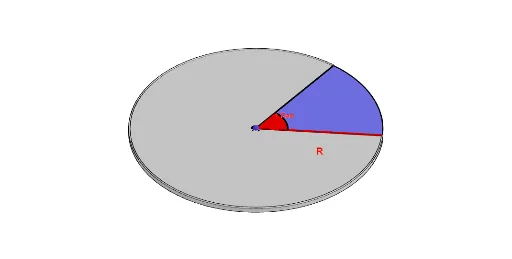
This example visually demonstrates the idea of radians by dynamically constructing a circle, a moving sector, and corresponding arcs to show how angular measure relates to circular geometry. Key concepts include radian measure, central angles, the geometry behind arc length, and proportionality-based interpretation that connects naturally to trigonometric thinking. Construction highlights in GeoGebra: If controls conditional visibility/updates of elements; Translate and Rotate generate the rotated geometry as the angle changes; Line, Segment, Circle, CircleSector, CircleArc, and CircumcircleArc build radii, chords/segments, sectors, and arc segments; Midpoint and circumcircle-related arc tools help with geometric placement; Sequence and Animation provide parameter-driven progression; Surface and text labels (e.g., texte1) are used to present the geometric region and key readouts. Suitable for secondary school through early undergraduate students, and for classroom demonstrations or self-study to build intuition for radians as a geometric measure.
GeoGebra Commands & Parameters
If(Animation ≤ 5, 0, If[5 < Animation < 10, (Animation - 5) / 5, 1]) → iTranslate(A, Vector[(If[Animation ≤ 5, Animation / 5, 1] * Vector[A, A + (0, 0, R)])]) → A'Line(A', yAxis) → fTranslate(B, Vector[(If[Animation ≤ 5, Animation / 5, 1] * Vector[B, A])]) → B'_{1}Rotate(B'_{1}, -1, f) → CRotate(B, 1, A) → B'Translate(B', Vector[(If[Animation ≤ 5, Animation / 5, 1] * Vector[B', C])]) → B''CircleSector(A', B'_{1}, B'', xOyPlane) → e_{1}Circle(A, R, xOyPlane) → cCircleSector(A, B, B', xOyPlane) → dTranslate(d, Vector[(If[Animation ≤ 5, Animation / 5, 1] * Vector[A, A + (0, 0, R)])]) → d'Segment(E, B) → hLine(A'', yAxis) → gMidpoint(E, A) → DRotate(e_{1}, i, f) → kTranslate(k, Vector[(i * Vector[A', E])]) → k'Rotate(e_{1}, i, g) → e2CircumcircleArc(B', F, B) → eSegment(B', A) → jSegment(A, B) → lMidpoint(l) → GTranslate(e, Vector[A, A - (0, 0, 0.05)]) → e'Line(A, zAxis) → nSurface(j, (2 * π) - 1, n) → bTranslate(B', Vector[A, A - (0, 0, 0.025)]) → B''_{1}Translate(A, Vector[A, A - (0, 0, 0.025)]) → A'_{1}Segment(B''_{1}, A'_{1}) → j'Surface(j', (2 * π) - 1, n) → oTranslate(k, Vector[(i * Vector[A', E])]) → k'_{1}Translate(k', Vector[A', A' + (0, 0.05, 0)]) → k''Translate(k', Vector[A', A' + (0, 0.05, 0)]) → k''_{1}Sequence(Translate[k', Vector[(i * Vector[A', A' + (0, 0.05, 0)])]], i, 0, 1, 0.1) → l1Sequence(Translate[e, Vector[(i * Vector[A, A - (0, 0, 0.05)])]], i, 0, 1, 0.2) → l2Midpoint(j) → HMidpoint(H, A) → IMidpoint(l) → JMidpoint(A, J) → KCircleArc(A, K, I) → pPolygon(I, A, K) → t1, k_1, i_1, a_1Midpoint(I, K) → LSequence(Translate[k'_{1}, Vector[(i * Vector[A, A + (0, 0, -0.05)])]], i, 0.1, 1, 0.1) → l3CircleArc(A, K, I) → q
AI Drawing Prompt Reference
Create a 3D geometric scene with a main horizontal circle of fixed radius. From a chosen center, draw a baseline radius and then generate a rotating second radius around the vertical axis to form a moving sector. Construct the corresponding sector region and the arc on the circle that matches the central angle, along with related arc segments and chord/segment connections between the arc endpoints. Use midpoint or other bisecting helper points on relevant segments to build auxiliary geometry for reading key relationships, and add an angle-dependent surface strip located near the circle to visualize how the arc portion grows. Include text annotations that present the main quantities linking radian/central angle, arc length behavior, and proportional circle measures, with the whole figure updating continuously as the angle changes.
The prompt above was compiled from the original drawing commands and is for reference only.