
Geometric Transformations and Probability Distributions Animation (1)
Loading the math board and drawing, please wait…
In collections
Congruence (CO) Cluster
Congruence (Vol 2)
CCSS High School: Geometry (Congruence) Volume 2
CCSS High School: Geometry (Congruence) Volume 2
CCSS High School: Geometry (Congruence) Volume 2
Geometry (Congruence) Volume 2
CCSS High School: Geometry (Congruence) Volume 2
CCSS High School: Geometry (Congruence) Volume 2
CCSS High School: Geometry (Congruence) Volume 2
CCSS High School: Geometry (Congruence) Volume 2
CCSS High School: Geometry (Congruence) Volume 2
CCSS High School: Geometry (Congruence) Volume 2
Gail LeBlancCCSS High School: Geometry (Congruence) Volume 2
CCSS High School: Geometry (Congruence) Volume 2
CCSS High School: Geometry (Congruence) Volume 2
Parallel Lines and Planes
Logic and Parallel Lines
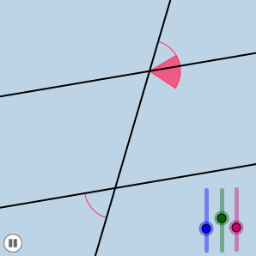
This example visually demonstrates geometric transformations such as rotation, translation, and dilation of points, lines, and circles, while integrating binomial and hypergeometric distributions from probability statistics. It covers core concepts including angles, straight lines, squares, geometric transformations, correlation, interest calculations, and probability distributions. The construction leverages GeoGebra commands like Point, Rotate, Angle, Line, Circle, Intersect, CircleSector, Dilate, Vector, Translate, and CircleArc. Suitable for high school and above, it enhances spatial reasoning and data analysis skills by linking geometric transformations with statistical concepts.
GeoGebra Commands & Parameters
Point(a) → BRotate(B, α, A) → B'Angle(B, A, B') → βLine(A, B') → bCircle(A, 1) → eIntersect(b, d) → CCircle(C, 1) → fIntersect(e, a) → D, EIntersect(e, b) → F, GIntersect(f, b) → H, IIntersect(f, d) → J, KCircleSector(C, K, I) → gCircleSector(C, I, J) → hCircleSector(A, D, F) → sCircleSector(A, F, E) → tDilate(A, If[0 < i < 1, 1 - i], C) → A'Vector(A, A') → uTranslate(s, u) → s'Translate(t, u) → t'CircleArc(C, K, I) → d_1CircleArc(C, I, J) → e_1CircleArc(A, D, F) → g_1CircleArc(A, F, E) → k_1Vector(A, C) → vTranslate(s, v) → s'_1Rotate(s'_1, (((i - 1) * 180))°, C) → kTranslate(t, v) → t'_1Rotate(t'_1, (((-(i - 1)) * 180))°, C) → p
AI Drawing Prompt Reference
Draw a point A and a point B, rotate B around A to form angle β, draw line b through A and B', draw circle e with A as center, find intersection C of line b and line d, draw circle f with C as center, find intersections D and E of circle e and line a, find intersections F and G of circle e and line b, find intersections H and I of circle f and line b, find intersections J and K of circle f and line d, draw arc g with C as center and K and I as endpoints, draw arc h with C as center and I and J as endpoints, draw arc s with A as center and D and F as endpoints, draw arc t with A as center and F and E as endpoints, scale A with C as center and ratio 1-i to get A', vector u from A to A', translate arc s by u to get s', translate arc t by u to get t', draw arc d_1 with C as center and K and I as endpoints, draw arc e_1 with C as center and I and J as endpoints, draw arc g_1 with A as center and D and F as endpoints, draw arc k_1 with A as center and F and E as endpoints, vector v from A to C, translate arc s' by v to get s'_1, rotate s'_1 by i*180 degrees around C to get k, translate arc t by v to get t'_1, rotate t'_1 by -(i-1)*180 degrees around C to get p.
The prompt above was compiled from the original drawing commands and is for reference only.