
Geometric Meaning of 0 < r < 1
Loading the math board and drawing, please wait…
In collections
ATC Cobwebs and Linear Difference Equations
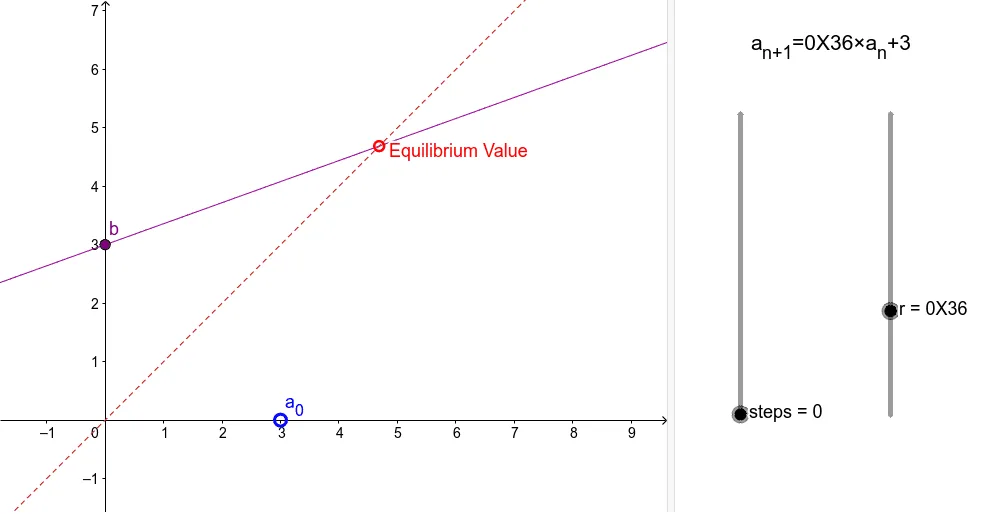
This example demonstrates the geometric significance of 0 < r < 1, involving core concepts of trigonometry and coordinate geometry. Using GeoGebra commands such as Point, Segment, and Intersect, it dynamically shows how r affects the shape. Suitable for high school mathematics education and learning.
GeoGebra Commands & Parameters
Point(yAxis) → CPoint(xAxis) → ASegment(A, (x(A), f(x(A)))) → cSegment((A1, A2), (A2, A2)) → B1Segment((A2, A2), (A2, A3)) → C1Segment((A2, A3), (A3, A3)) → B2Segment((A3, A3), (A3, A4)) → C2Segment((A3, A4), (A4, A4)) → B3Segment((A4, A4), (A4, A5)) → C3Segment((A4, A5), (A5, A5)) → B4Segment((A5, A5), (A5, A6)) → C4Segment((A5, A6), (A6, A6)) → B5Segment((A6, A6), (A6, A7)) → C5Segment((A6, A7), (A7, A7)) → B6Segment((A7, A7), (A7, A8)) → C6Segment((A7, A8), (A8, A8)) → B7Segment((A8, A8), (A8, A9)) → C7Segment((A8, A9), (A9, A9)) → B8Segment((A9, A9), (A9, A10)) → C8Segment((A9, A10), (A10, A10)) → B9Segment((A10, A10), (A10, A11)) → C9Segment((A10, A11), (A11, A11)) → B10Segment((A11, A11), (A11, A12)) → C10Segment((A11, A12), (A12, A12)) → B11Segment((A12, A12), (A12, A13)) → C11Segment((A12, A13), (A13, A13)) → B12Segment((A13, A13), (A13, A14)) → C12Segment((A13, A14), (A14, A14)) → B13Segment((A14, A14), (A14, A15)) → C13Segment((A14, A15), (A15, A15)) → B14Segment((A15, A15), (A15, A16)) → C14Segment((A15, A16), (A16, A16)) → B15Segment((A16, A16), (A16, A17)) → C15Segment((A16, A17), (A17, A17)) → B16Segment((A17, A17), (A17, A18)) → C16Segment((A17, A18), (A18, A18)) → B17Segment((A18, A18), (A18, A19)) → C17Segment((A18, A19), (A19, A19)) → B18Segment((A19, A19), (A19, A20)) → C18Segment((A19, A20), (A20, A20)) → B19Segment((A20, A20), (A20, A21)) → C19Segment((A20, A21), (A21, A21)) → B20Segment((A21, A21), (A21, A22)) → C20Segment((A21, A22), (A22, A22)) → B21Segment((A22, A22), (A22, A23)) → C21Segment((A22, A23), (A23, A23)) → B22Segment((A23, A23), (A23, A24)) → C22Segment((A23, A24), (A24, A24)) → B23Segment((A24, A24), (A24, A25)) → C23Segment((A24, A25), (A25, A25)) → B24Segment((A25, A25), (A25, A26)) → C24Segment((A25, A26), (A26, A26)) → B25Segment((A26, A26), (A26, A27)) → C25Segment((A26, A27), (A27, A27)) → B26Segment((A27, A27), (A27, A28)) → C26Segment((A27, A28), (A28, A28)) → B27Segment((A28, A28), (A28, A29)) → C27Segment((A28, A29), (A29, A29)) → B28Segment((A29, A29), (A29, A30)) → C28Segment((A29, A30), (A30, A30)) → B29Segment((A30, A30), (A30, A31)) → C29Segment((A30, A31), (A31, A31)) → B30Segment((A31, A31), (A31, A32)) → C30Segment((A31, A32), (A32, A32)) → B31Segment((A32, A32), (A32, A33)) → C31Segment((A32, A33), (A33, A33)) → B32Segment((A33, A33), (A33, A34)) → C32Segment((A33, A34), (A34, A34)) → B33Segment((A34, A34), (A34, A35)) → C33Segment((A34, A35), (A35, A35)) → B34Segment((A35, A35), (A35, A36)) → C34Segment((A35, A36), (A36, A36)) → B35Segment((A36, A36), (A36, A37)) → C35Segment((A36, A37), (A37, A37)) → B36Segment((A37, A37), (A37, A38)) → C36Segment((A37, A38), (A38, A38)) → B37Segment((A38, A38), (A38, A39)) → C37Segment((A38, A39), (A39, A39)) → B38Segment((A39, A39), (A39, A40)) → C38Intersect(f, b) → B
AI Drawing Prompt Reference
Draw a coordinate system with points on the x-axis and y-axis. From the point on the x-axis, draw a line segment to a function graph, then from the point on the graph, draw multiple line segments to both axes, creating a spiral-like shape to illustrate the geometric meaning of 0 < r < 1.
The prompt above was compiled from the original drawing commands and is for reference only.