
Geometric Mean in a Right Triangle via Altitude (Leg)
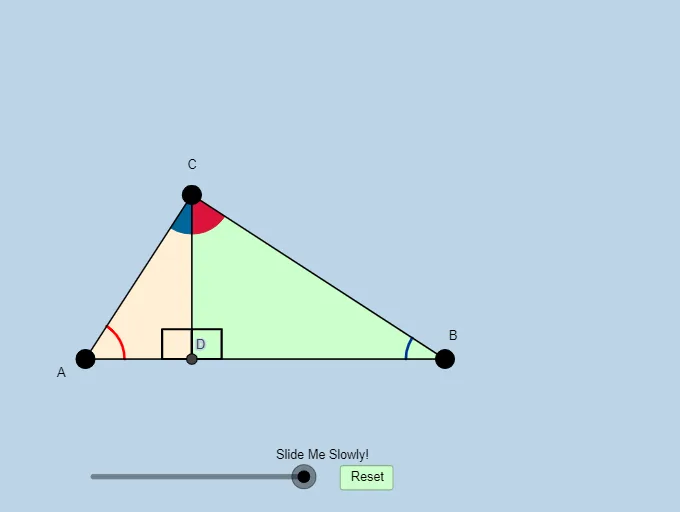
Loading the math board and drawing, please wait…
This GeoGebra applet lets students discover and recall a key relationship in a right triangle: when the altitude is drawn to the hypotenuse, the segment lengths produced satisfy the geometric-mean principle (the relevant leg/segment length emerges as a square-root relationship from similar triangles). It emphasizes how perpendicular constructions generate proportional segments through similarity.
Core concepts include right-triangle geometry, constructing an altitude, similar triangles, geometric mean (square-root length relations from products), and angle relationships.
Construction highlights: Semicircle and Circle/CircleArc are used to build the auxiliary curved geometry (often inspired by the Thales setup), while Point and Segment define the triangle and key vertices. OrthogonalLine creates the altitude to the hypotenuse; Intersect finds key intersection points used to establish the relationships. Angle and Polygon help highlight corresponding angles/regions that prove similarity. Additional commands such as Dilate, Vector, Translate, and Rotate support visual correspondence by scaling and moving constructed figures, with CircleSector and CircleArc used to emphasize circular/sector components.
Suitable for: middle and high school students studying similarity and right-triangle theorems, and for classroom inquiry activities or homework-based self-checking of the geometric-mean result.
GeoGebra Commands & Parameters
Semicircle(A, B) → dPoint(d) → CSegment(C, B) → fSegment(A, C) → eSegment(A, B) → aMin(a, f) → mMin(a, e) → lMin(l, m) → nMidpoint(a) → C_1OrthogonalLine(C_1, a) → bCircle(C_1, A) → cOrthogonalLine(C, a) → gIntersect(g, a) → ESegment(C, E) → hAngle(B, E, C) → αAngle(A, C, B) → βPolygon(A, E, C) → poly1, d_1, a_1, e_1Polygon(E, B, C) → poly2, d_2, e_2, b_1Circle(A, (0.2 * n)) → kCircle(C, (0.2 * n)) → pCircle(B, (0.2 * n)) → qIntersect(p, e_1, 1) → FIntersect(a_1, b_1) → GIntersect(a_1, b_1) → HIntersect(p, h, 1) → IIntersect(p, f, 1) → JIntersect(q, a, 1) → KIntersect(q, f, 1) → LIntersect(k, a, 1) → MIntersect(k, e, 1) → NCircleSector(A, M, N) → rDilate(C, If[-2 < i < -1, -1 - i, 0], E) → D'Segment(C, D') → jCircleSector(B, L, K) → tAngle(C, E, A) → γDilate(A, If[-0.5 < i ≤ 0.5, 0.5 - i, 0], C) → A'Vector(A, A') → uTranslate(r, u) → r'CircleArc(A, M, N) → f_1Dilate(B, If[1.5 < i ≤ 2.5, 2.5 - i, 0], C) → B'Vector(B, B') → vTranslate(t, v) → t'CircleArc(B, L, K) → g_1Polygon(A, B, C) → poly3, d_3, a_2, b_2Rotate(r', If[0.5 < i ≤ 1.5, ((-(i - 0.5)) * π / 2), -1.5707963267948966], C) → r''Translate(t, v) → t'_1Rotate(t'_1, If[2.5 < i ≤ 3.5, ((i - 2.5) * 90°), 90°], C) → sIntersect(a, j) → D
AI Drawing Prompt Reference
Draw a right triangle with an altitude drawn from the right angle to the hypotenuse, creating two smaller triangles. The large triangle is similar to the smaller ones, demonstrating the geometric mean property: a leg's length is the geometric mean of the other two legs. Use circles and semicircles in the construction, highlight key angles and sides, and use different colors or line weights to emphasize the similar triangles and the geometric mean relationship.
The prompt above was compiled from the original drawing commands and is for reference only.