
Geometric Interpretation of the Cross Product
Loading the math board and drawing, please wait…
In collections
Multivariable Calculus
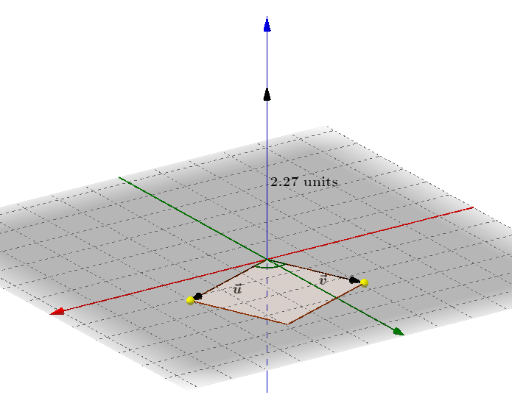
This example demonstrates the geometric interpretation of the cross product in a plane, dynamically showing the relationship between the magnitude of the cross product and the area of the corresponding parallelogram. Key math concepts include vectors, cross product, parallelograms, and angles. Construction highlights involve GeoGebra commands like Plane, PointIn, Vector, Polygon, Angle, and objects such as XY-plane, points P/Q, vectors u/v/T/w/O/R, polygon poly1, functions f/g/h/i, and texts/textures α/β. Suitable for high school and above students to learn vector cross product geometry and analytical geometry teaching.
GeoGebra Commands & Parameters
Plane((0, 0, 0), (1, 0, 0), (0, 1, 0)) → XYPointIn(XY) → PPointIn(XY) → QVector(P) → uVector(Q) → vVector(T) → wPolygon(O, P, R, Q) → poly1, f, g, h, iAngle(u, v) → αAngle(u, v) → β
AI Drawing Prompt Reference
Draw two points P and Q on a plane, then draw vectors u and v starting from the origin, connecting these points to form a parallelogram. Demonstrate the geometric interpretation of the cross product by dynamically showing the relationship between the magnitude of the cross product and the area of the parallelogram, and label the angle between the vectors as α and β to illustrate the concept of vector cross product and analytical geometry.
The prompt above was compiled from the original drawing commands and is for reference only.