
Geometric Interpretation of Sine and Cosine
Loading the math board and drawing, please wait…
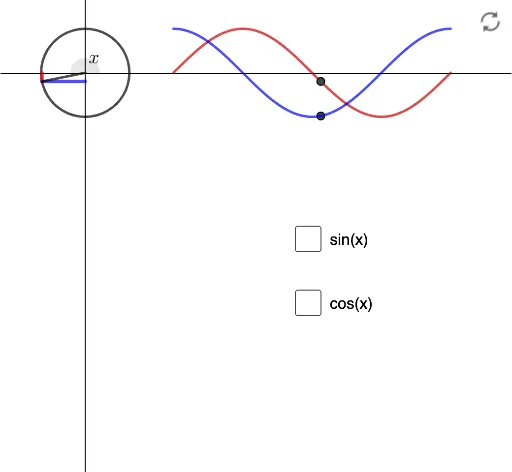
This example demonstrates the geometric meaning of sine and cosine on the unit circle, visually linking angles with trigonometric values through dynamic illustration. Core math concepts include the unit circle, trigonometric functions, angles, and vectors. Construction highlights involve commands like Vector, Circle, Segment, Translate, Rotate, and Angle from GeoGebra, emphasizing dynamic geometry. Ideal for high school trigonometry instruction to enhance conceptual understanding.
GeoGebra Commands & Parameters
Vector((0, 0), (trans, 0)) → uCircle((0, 0), 1) → CSegment((x(A), 0), A) → sSegment((0, y(A)), A) → cTranslate(f, u) → ffRotate(Translate[g, u], (-rot), (0, 0)) → ggSegment((x(P1), 0), P1) → sP1Vector((x(A), 0), (x(P1), 0)) → vtTranslate(s, Vector[(tr * vt) + ((1 - tr) * 0)]) → stVector(A, (P1 * tr) + ((1 - tr) * A)) → v1Vector((0, y(A)), (0, y(P2))) → vt2Translate(c, Vector[(tr2 * vt2) + ((1 - tr2) * 0)]) → st2Vector(A, (P2 * tr2) + ((1 - tr2) * A)) → v2Segment((0, 0), A) → ssAngle((100, 0), (0, 0), A) → αTranslate(g, u) → g_1