
Geometric Fidget Spinner
Loading the math board and drawing, please wait…
In collections
Algebra 1
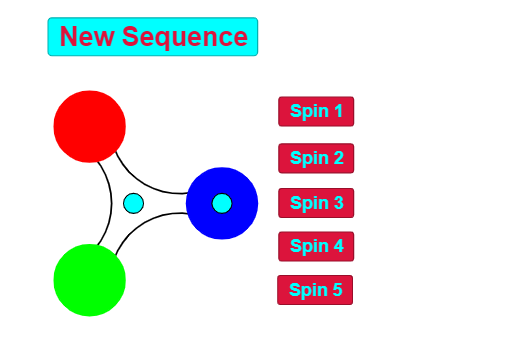
This example demonstrates the construction of a dynamic geometric fidget spinner model using geometric shapes and trigonometric functions. Core math concepts include trigonometric functions, vector operations, coordinate geometry, and geometric constructions. Key GeoGebra commands and objects used are Circle, Intersect, Midpoint, CircumcircleArc, and Textfield, as outlined in the construction summary. Suitable for high school students and above to explore 2D geometry, vectors, and function applications, ideal for math education and enrichment activities.
GeoGebra Commands & Parameters
Circle((0, 0), 1) → uCircle(P, 1.73) → cIntersect(c, u) → A, B, ,Midpoint(A, B) → DMidpoint(A, P) → EMidpoint(B, P) → FMidpoint(D, C) → GMidpoint(E, C) → HMidpoint(C, F) → ICircle(B, 0.25) → d_2Circle(P, 0.25) → eCircle(A, 0.25) → g_2Intersect(d_2, u) → J, K, ,Intersect(u, g_2) → L, M, ,Intersect(e, u) → O, Q, ,CircumcircleArc(M, G, K) → h_2CircumcircleArc(J, I, Q) → kCircumcircleArc(O, H, L) → pCircle(P, 0.4) → qCircle(B, 0.4) → tCircle(A, 0.4) → c_1Circle(N, 1.73) → d_1Intersect(d_1, u) → R, S, ,Circle(N, 0.25) → e_1Circle(S, 0.25) → f_1Circle(R, 0.25) → g_1Intersect(u, f_1) → T, U, ,Intersect(g_1, u) → V, W, ,Intersect(e_1, u) → Z, A_1, ,Midpoint(S, R) → B_1Midpoint(R, N) → C_1Midpoint(N, S) → D_1Midpoint(B_1, C) → E_1Midpoint(C_1, C) → F_1Midpoint(D_1, C) → G_1CircumcircleArc(T, E_1, V) → h_1CircumcircleArc(W, F_1, Z) → k_1CircumcircleArc(A_1, G_1, U) → p_1Circle(S, 0.4) → s_1Circle(R, 0.4) → r_1Circle(N, 0.4) → q_1Textfield(g) → InputBox1Textfield(g) → InputBox2Textfield(g) → InputBox3Textfield(g) → InputBox4Textfield(g) → InputBox5
AI Drawing Prompt Reference
Draw a dynamic geometric fidget spinner model with three concentric circles and three circles with radius 0.25, and three circles with radius 0.4. Define circles using their centers and radii, and construct the geometric shapes using intersections and midpoints. Start by drawing a circle with radius 1, then draw three circles with radius 1.73, followed by three circles with radius 0.25, and finally three circles with radius 0.4, constructing the various parts of the geometric shapes through intersections and midpoints.
The prompt above was compiled from the original drawing commands and is for reference only.