
Geometric Demo of Negative Subtraction and Division
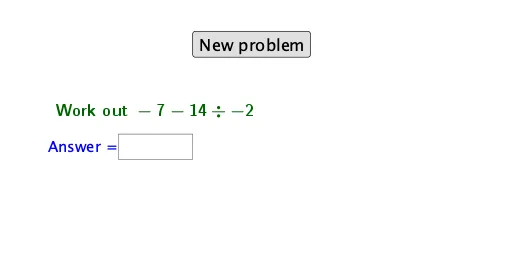
Loading the math board and drawing, please wait…
This example demonstrates, through coupled geometric and algebraic visualization, how negative numbers behave under subtraction and division. It highlights the sign rules and how the computed results relate to the orientation and magnitude implied by the picture, making the meaning of “subtracting a negative” and the sign of a quotient easier to grasp. Key concepts include representing negative numbers, interpreting subtraction as addition of the opposite, understanding the sign of a quotient in division, and using conditional logic to adapt the displayed computation to different parameter cases. In construction, Random generates varying parameters; If controls which computation/display branch is used depending on conditions; Textfield and InputBox1 (together with text1 and text2) present variables and expressions; LCM is used to unify or scale parameters for consistent construction; and button1 enables interactive operation. The listed geometric elements (e, j, k, d, a, i, l, b, g, f, h) are connected to these numeric variables to update the surface/shape relations and the associated equations. Suitable for middle and high school math lessons or interactive self-study focused on negative-number operations.
GeoGebra Commands & Parameters
Random(1, 99) → eRandom(1, 2) → jRandom(-12, 12) → dRandom(-12, 12) → aLCM(a, d) → iRandom(-12, 12) → bTextfield(c) → InputBox1If(c ≟ s, "Correct!", "No. Try again.") → text2
AI Drawing Prompt Reference
Describe a geometric and algebraic visualization showing the behavior of negative numbers in subtraction and division. Emphasize sign rules and how results relate to orientation and magnitude in the picture. Key concepts include representing negative numbers, interpreting subtraction as addition of the opposite, understanding the sign of a quotient in division, and using conditional logic to adapt to different parameter cases. Construction order: randomly generate parameters, unify parameters, display variables and expressions, and enable interactive operation.
The prompt above was compiled from the original drawing commands and is for reference only.