
Simplifying Products and Quotients of Square Roots: GeoGebra Interactive Practic
Loading the math board and drawing, please wait…
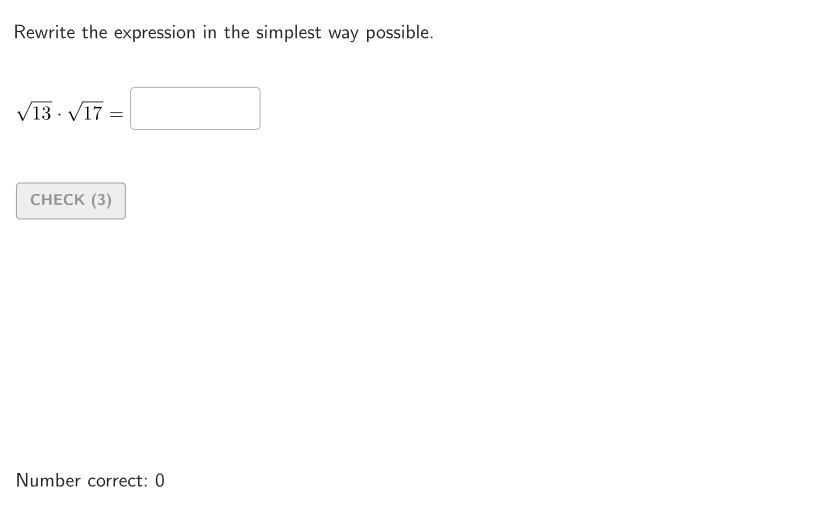
This example demonstrates how to rewrite expressions involving square-root products and quotients into their simplest forms. The key math concepts are the product and quotient properties of radicals (e.g., √(a)·√(b)=√(ab) and √(a)/√(b)=√(a/b) under standard conditions), plus simplification by factoring the radicand and pairing perfect squares to obtain the simplest radical expression. Construction and interactivity are built around GeoGebra commands and objects: “Textfield” collects the student’s proposed simplification, “AreEqual” checks whether the entered result is equivalent to the expected one, and “Sequence” together with “Shuffle” generates and randomizes multiple question cases. Logic and robustness are handled with “Element”, “Take”, “RemoveUndefined”, “Defined”, and “If” to manage valid objects and conditional flow. “Polygon” and “Corner” support layout/visual scaffolding, while “TextToUnicode” helps generate consistent interface text. Suitable for grades 9–12 as guided practice on simplifying radical expressions, including classroom drills and self-paced homework.
GeoGebra Commands & Parameters
Element(allCaseNum, Mod[countQuestion, Length[allCaseNum]] + 1) → caseNumSequence(Random[0, 99] / 100, A, 1, 200) → allRandomSeeds, {0.88, 0.49, 0.55, 0.81, 0.63, 0.45, 0.91, 0.69, 0.11, 0, 0.5, 0.23, 0.23, 0.53, 0.35, 0.94, 0.03, 0.33, 0.72, 0.69, 0.82, 0.39, 0.25, 0.08, 0.22, 0.2, 0.35, 0.82, 0.36, 0.57, 0.93, 0.99, 0.86, 0.15, 0.02, 0.5, 0.31, 0.22, 0.35, 0.16, 0.97, 0.98, 0.68, 0.41, 0.22, 0.06, 0.98, 0.99, 0.05, 0.74, 0.19, 0.25, 0.81, 0.4, 0.82, 0.36, 0.4, 0.87, 0.02, 0.46, 0.7, 0.38, 0.3, 0.68, 0.57, 0.24, 0.63, 0.3, 0.37, 0.8, 0.46, 0.99, 0.13, 0.91, 0.9, 0.39, 0.93, 0.66, 0.09, 0.58, 0.43, 0.47, 0.95, 0.93, 0.88, 0.6, 0.8, 0.52, 0.64, 0.72, 0.6, 0.43, 0.78, 0.45, 0.29, 0.86, 0.11, 0.79, 0.64, 0.73, 0.54, 0.87, 0.12, 0.68, 0.17, 0.52, 0.8, 0.8, 0.46, 0.91, 0.09, 0.43, 0.17, 0.29, 0.57, 0.58, 0.35, 0.15, 0.51, 0.22, 0.24, 0.41, 0.71, 0.53, 0.07, 0.29, 0.03, 0.31, 0.02, 0.16, 0.67, 0.25, 0.73, 0.31, 0.14, 0.17, 0.75, 0.99, 0.46, 0.36, 0.92, 0.89, 0.42, 0.5, 0.46, 0.5, 0.87, 0.4, 0.07, 0.2, 0.84, 0.83, 0.57, 0, 0.92, 0.8, 0.53, 0.56, 0.87, 0.8, 0.18, 0.71, 0.82, 0.48, 0.1, 0.23, 0.47, 0.55, 0.95, 0.54, 0.12, 0.6, 0.24, 0.9, 0.55, 0.7, 0.55, 0.64, 0.79, 0.82, 0.75, 0.64, 0.19, 0.88, 0.71, 0.04, 0.6, 0.29, 0.05, 0.14, 0.22, 0.65, 0.73, 0.16, 0.59, 0.3, 0.06, 0.03, 0.4, 0.23}Take(allRandomSeeds, randIndex, randIndex + numRandoms - 1) → currentRandomSeedsShuffle({3, 5, 7, 11, 13, 17}) → allA1, {13, 17, 7, 5, 11, 3}Element(allA1, Mod[countQuestion, Length[allA1]] + 1) → factA1Shuffle(allA1 \ {factA1}) → allB1, {17, 11, 7, 5, 3}Element(allB1, Mod[countQuestion, Length[allB1]] + 1) → factB1Shuffle({3, 5, 7, 11}) → allA2, {5, 3, 7, 11}Element(allA2, Mod[countQuestion, Length[allA2]] + 1) → baseA2Shuffle({2, 3, 4, 5}) → allB2, {4, 3, 2, 5}Element(allB2, Mod[countQuestion, Length[allB2]] + 1) → divisorB2Textfield(inputB) → InputBoxBTextfield(inputA) → InputBoxAAreEqual(InputBoxA, givenVal1) → correctValue1Polygon(Zip[PixelsToPoint[Corner[1], Corner[3], Corner[5], A], A, {(pixelsLeft, pixelsTop), (pixelsLeft, y(Corner[5]) - pixelsBottom), Corner[5] - (pixelsRight, pixelsBottom), (x(Corner[5]) - pixelsRight, pixelsTop)}]) → borderBoxCorner(5) → layoutAppSizeonboardingTextOffset(Corner[onboardingText, 1], Corner[onboardingText, 3], onboardingCase, Corner[1], Corner[3], Corner[5]) → OnboardingTextOffsetTextfield(inputC) → InputBoxCAreEqual(InputBoxA, givenVal2) → correctValue2TextToUnicode("0123456789") → allDigitsRemoveUndefined(Zip[If[Defined[IndexOf[A, allDigits]], A], A, inputCurrentUni]) → studentDigitsDefined(IndexOf[Sort[studentDigits], expectedDigits]) → correctSimpl1Defined(IndexOf[Sort[studentDigits], expectedDigits]) → correctSimpl2If(caseNum ≟ 1 ∧ prod ≥ 100, 125, caseNum ≟ 1 ∧ prod < 100, 115, 78) → inputPosX
AI Drawing Prompt Reference
This is an interactive math practice interface with three input boxes for students to enter simplified radical expressions. Below are answer verification areas that compare entered results with expected values. On the right, random radical product or quotient problems are generated, with case numbers and random seeds assigned automatically. The layout is clean, input boxes aligned with verification areas, and random problem cases displayed as a list, suitable for classroom drills and self-paced learning.
The prompt above was compiled from the original drawing commands and is for reference only.