
Geometric Definition of the Derivative at a Point via Secant-to-Tangent
Loading the math board and drawing, please wait…
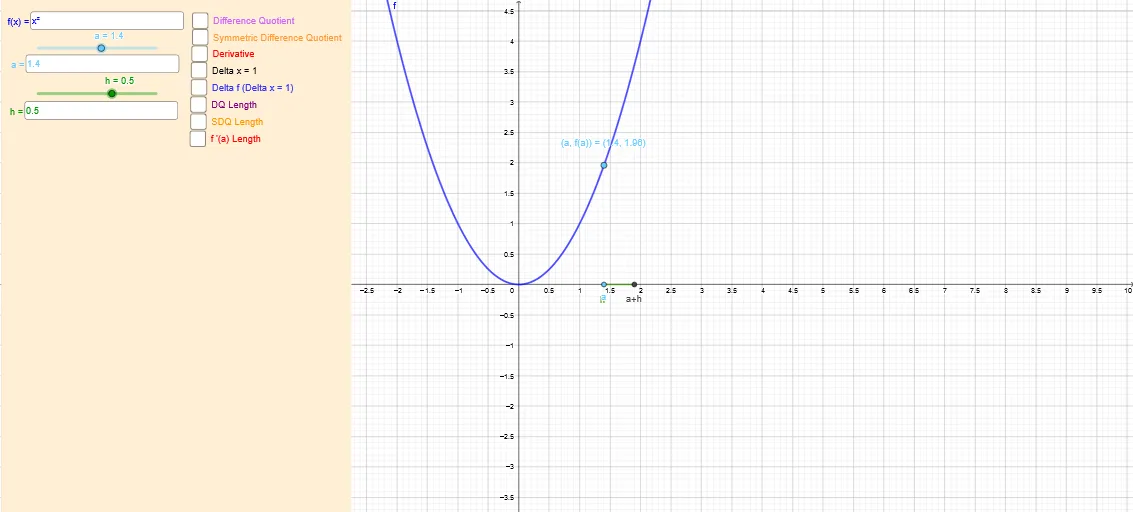
This example demonstrates how the derivative at a chosen point is obtained geometrically by letting a secant line through two nearby points approach the tangent line at that point. It visualizes the key idea that the slope of the tangent equals the limit of the difference quotient as the separation h tends to 0. The main concepts include the derivative definition, difference quotient, tangent and slope, and the limiting process (h → 0) interpreted on a function graph as linear approximation. Construction-wise, the setup uses the function f and a selected point A, creates an additional point depending on the offset h, forms candidate secant/tangent lines using Line and OrthogonalLine, computes intersections with Intersect, and uses Vector and Segment to represent directional information and the relevant line segments. Midpoint supports auxiliary symmetric/averaging constructions. Textfield is used to parameterize and label variables and computed quantities (e.g., the slope-related expression). Key GeoGebra commands involved are Textfield, OrthogonalLine, Intersect, Vector, Line, Segment, and Midpoint, operating on objects such as f, a, h, A, eq1/eq2, and multiple labeled points and helper elements. Suitable for high school through first-year calculus, especially for teaching and learning the geometric meaning of the derivative and how it arises from limits.
GeoGebra Commands & Parameters
Textfield(f) → InputBox1Textfield(a) → InputBox2Textfield(h) → InputBox3OrthogonalLine(B, eq2) → iIntersect(eq2, i) → EVector(E, D) → vVector(B, E) → uLine(B, D) → jLine(F, H) → lVector(F, G) → wVector(G, H) → mSegment(A, C) → qLine(B, M) → rVector(J, M) → sMidpoint(J, M) → OVector(J, L) → u_1Midpoint(L, J) → PSegment(B, J) → f_1Vector(J, K) → v_1Midpoint(K, J) → QLine(B, K) → g_1Intersect(f, r) → R, SVector(J, N) → w_1Midpoint(N, J) → T
AI Drawing Prompt Reference
Draw a function curve with a selected point on it. Create a nearby point by adjusting a horizontal offset from the selected point. Connect these two points to form a secant line, then let the offset approach zero so the secant approaches the tangent line at the selected point. Also draw a line perpendicular to the tangent at the point, along with vectors and segments between the points to illustrate the difference quotient and slope. Include input boxes to adjust the function, point position, and offset, and display computed values.
The prompt above was compiled from the original drawing commands and is for reference only.