
Descriptive Statistics Dot Plot and Box Plot for Two Data Sets
Loading the math board and drawing, please wait…
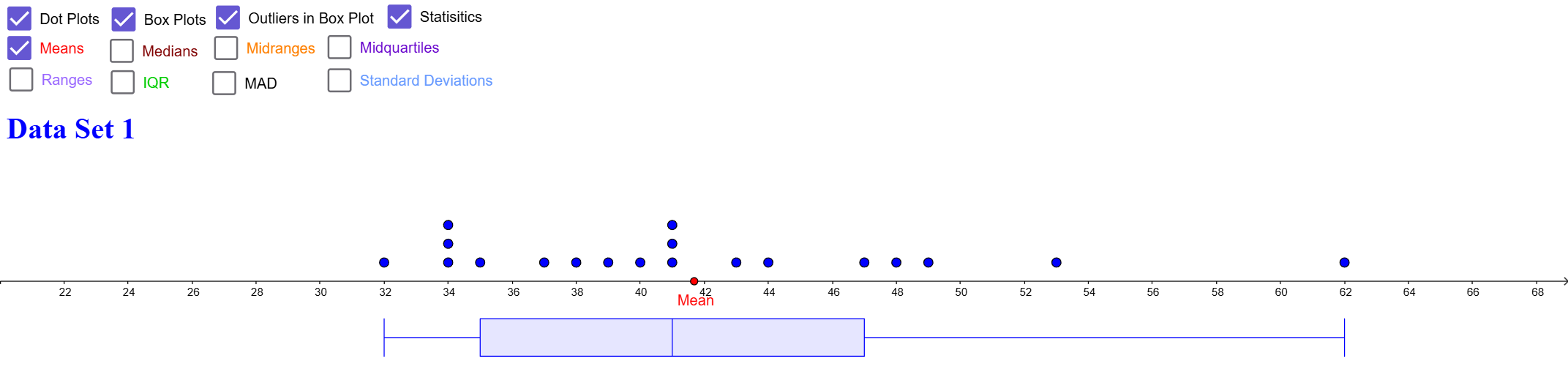
① This example demonstrates how to generate dot plots and box plots for two data sets simultaneously, along with automatic computation of descriptive statistics, allowing direct visual comparison of the distributions. ② Core mathematical concepts include descriptive statistics: minimum, first quartile (Q1), median, third quartile (Q3), maximum, mean, mode, mean absolute deviation (MAD), and standard deviation, as well as graphical representations via dot plots and box plots. ③ Construction highlights: from the construction summary, GeoGebra commands Min, Q1, Median, Q3, Max, mean, Mode, mad, stdev are used to calculate statistics, while DotPlot and BoxPlot commands create the plots, and Segment commands connect relevant points for clarity; the object list includes two sets of data points (A-series and B-series) and corresponding statistic objects. ④ Suitable for middle school statistics and probability lessons, as well as introductory college statistics courses, helping students understand data distribution, spread, and five-number summaries, and master quick data analysis with GeoGebra.
GeoGebra Commands & Parameters
Min(CellRange(A2,A101,"numeric")) → E2Q1(CellRange(A2,A101,"numeric")) → E3Median(CellRange(A2,A101,"numeric")) → E4Q3(CellRange(A2,A101,"numeric")) → E5Max(CellRange(A2,A101,"numeric")) → E6mean(CellRange(A2,A101,"numeric")) → E8Median(CellRange(A2,A101,"numeric")) → E9Mode(CellRange(A2,A101,"numeric")) → E10mad(CellRange(A2,A101,"numeric")) → E16stdev(CellRange(A2,A101,"numeric")) → E17Min(CellRange(B2,B101,"numeric")) → F2Q1(CellRange(B2,B101,"numeric")) → F3Median(CellRange(B2,B101,"numeric")) → F4Q3(CellRange(B2,B101,"numeric")) → F5Max(CellRange(B2,B101,"numeric")) → F6mean(CellRange(B2,B101,"numeric")) → F8Median(CellRange(B2,B101,"numeric")) → F9Mode(CellRange(B2,B101,"numeric")) → F10mad(CellRange(B2,B101,"numeric")) → F16stdev(CellRange(B2,B101,"numeric")) → F17DotPlot(CellRange(B2,B101,"numeric")) → l2BoxPlot(-3, 1, CellRange(B2,B101,"numeric"), c) → nSegment((E2, -1), (E6, -1)) → pSegment((F2, -1), (F6, -1)) → qSegment((E3, -4.5), (E5, -4.5)) → rSegment((F3, -4.5), (F5, -4.5)) → sSegment((E8 - E16 / 2, -0.5), (E8 + E16 / 2, -0.5)) → tSegment((F8 - F16 / 2, -0.5), (F8 + F16 / 2, -0.5)) → f_1Segment((E8 - E17 / 2, -1), (E8 + E17 / 2, -1)) → g_1Segment((F8 - F17 / 2, -1), (F8 + F17 / 2, -1)) → h_1DotPlot(CellRange(A2,A201,"numeric")) → l1BoxPlot(-3, 1, CellRange(A2,A201,"numeric"), c) → m
AI Drawing Prompt Reference
Create dot plots and box plots for two sets of data, calculate and display the minimum, first quartile, median, third quartile, maximum, mean, mode, mean absolute deviation, and standard deviation for each set. Place the statistical information and plots in the same coordinate system, and use segments to connect key statistical values for a clear comparison of the distribution and dispersion of the two sets of data.
The prompt above was compiled from the original drawing commands and is for reference only.