
Geometric Construction of Vectors and Quadratic Equations
Loading the math board and drawing, please wait…
In collections
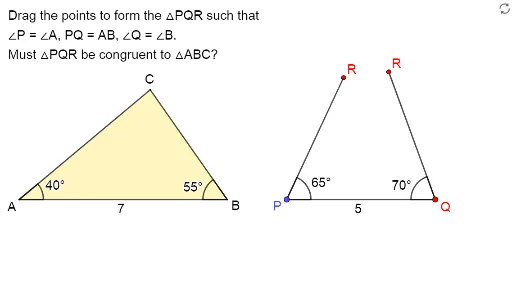
Exploring the Conditions for Congruence of 2 Triangles
Exploring Congruence of Triangles
This example demonstrates the geometric construction of vectors and quadratic equations using GeoGebra. Key mathematical concepts include vectors, quadratic equations, and coordinate geometry. By using commands such as Point, Vector, Sequence, and Intersect, the example dynamically illustrates vector addition, roots of quadratic equations, and their relationships in the coordinate system. Suitable for high school mathematics education and learning.
GeoGebra Commands & Parameters
Point(Sequence[A + (i, 0), i, 1, 20, 1]) → BVector(B, C2) → vSequence((x(B) + (Length[v] * cos(t°)), y(B) + (Length[v] * sin(t°))), t, 0, 355, 5) → UPointsVector(A, C1) → uSequence((x(A) + (Length[u] * cos(t°)), y(A) + (Length[u] * sin(t°))), t, 0, 355, 5) → VPointsIntersect(Ray[D, Rotate[D + (1, 0), 40°, D]], Ray[E, Rotate[E - (1, 0), (-(55°)), E]]) → FSegment(F, D) → kSegment(E, F) → jDynamicCoordinates(C1, x(ClosestPoint[VPoints, C1]), y(ClosestPoint[VPoints, C1])) → CSegment(A, C) → fSegment(A, B) → gDynamicCoordinates(C2, x(ClosestPoint[UPoints, C2]), y(ClosestPoint[UPoints, C2])) → C'Segment(C', B) → hIntersect(Ray[A, C], Ray[B, C']) → GPolygon({A, B, G}) → t1If(C ≟ G ∧ C' ≟ G, true, false) → closed1Segment(D, E) → iPolygon(D, E, F) → t3, l, m, nAngle(E, D, F) → αAngle(B, A, C) → βAngle(F, E, D) → γAngle(C', B, A) → δ
AI Drawing Prompt Reference
Draw a geometric figure involving vectors and quadratic equations. First, create vector v and generate a series of points UPoints parallel to v. Then, create vector u and generate a series of points VPoints parallel to u. Use rotation and intersection operations to find points F and G, and draw triangles t1 and t3. Finally, calculate angles α, β, γ, and δ.
The prompt above was compiled from the original drawing commands and is for reference only.