
Geometric Construction of Vector Addition by Ramon Pereira da Silva
Loading the math board and drawing, please wait…
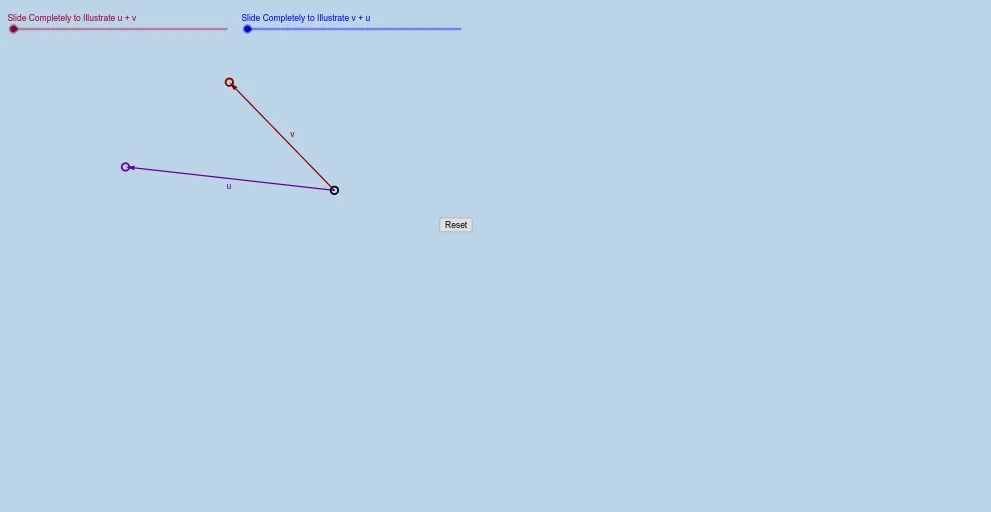
This example demonstrates, in the plane, how to add two vectors and obtain the resultant vector’s direction and magnitude through geometric construction. It centers on vector addition (head-to-tail rule), the idea that vectors are equivalent up to translation, and the use of transformations to build controlled vector copies. The construction uses GeoGebra commands such as Vector to create the initial vectors, Rotate to adjust their orientations, Dilate to scale their lengths, and Translate to reposition them consistently. A Textfield is used to display or input parameters and key quantities, while multiple derived objects (e.g., labeled variants of points/vectors with prime marks and subscripts) are generated to compare the constructed intermediate vectors with the final resultant. Suitable for middle and high school students and early university learners, as well as for classroom demonstrations and geometry-based vector exercises.
GeoGebra Commands & Parameters
Vector(A, B) → vVector(A, C) → uRotate(C, If[0 < a ≤ 1, (a * 180°), 180°], A) → C'Dilate(A, If[1 < a < 2, 2 - a, 1], B) → A'Vector(A, A') → bRotate(C, 180°, A) → C'_1Translate(C'_1, b) → DTranslate(C'_1, v) → EVector(A, E) → fTextfield() → InputBox1Dilate(A, If[0 < a ≤ 1, 1 - a, 0], C) → A'_1Vector(A, A'_1) → wTranslate(B, w) → B'Vector(A'_1, B') → cDilate(A, If[1 < a ≤ 2, 2 - a, 0], B') → A'_2Vector(A, A'_2) → dVector(A, B) → eDilate(A, If[0 < g ≤ 1, 1 - g, 0], B) → A'_3Vector(A, A'_3) → hTranslate(C, h) → C'_2Vector(A'_3, C'_2) → iVector(A, C) → jDilate(A, If[1 < g ≤ 2, 2 - g, 0], C'_2) → A'_4Vector(A, A'_4) → k
AI Drawing Prompt Reference
Draw two vectors starting from a common point, one pointing up-right and the other up-left. Create rotated and scaled copies of these vectors, then translate them so they connect head-to-tail, forming a resultant vector that represents their sum. Include several auxiliary points and vectors with prime marks or subscripts to compare intermediate constructions with the final result. Add an input box to adjust parameters that change vector lengths and directions, dynamically demonstrating the geometric process of vector addition. Clearly mark all vector start and end points with direction arrows, illustrating translation equivalence and the triangle rule.
The prompt above was compiled from the original drawing commands and is for reference only.