
Geometric Construction of Polygon Midline/Median Features (GeoGebra)
Loading the math board and drawing, please wait…
In collections
geometriadinamica.es
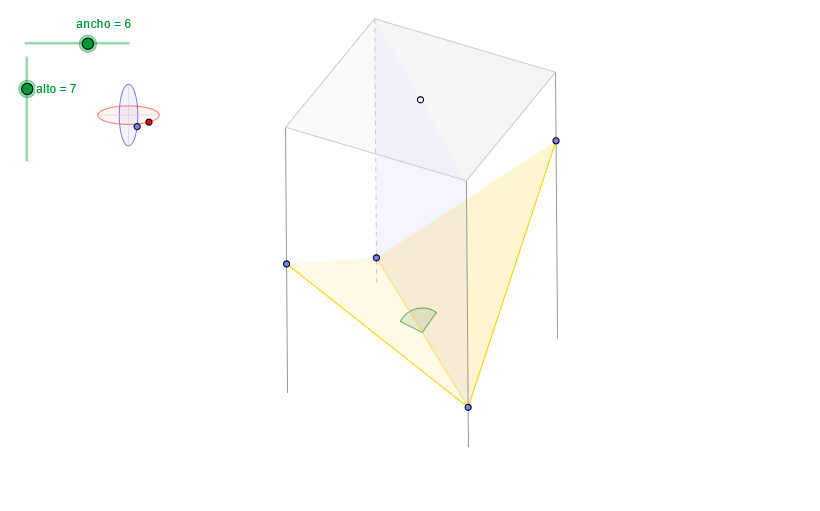
This example demonstrates how to construct a planar polygon from carefully defined points and then use midpoint-related elements to visualize statistical-style characteristics (e.g., where a median/midline effect occurs) in a geometric way. It connects core ideas from polygon geometry—edges and notable points—with vector-based descriptions and angle/direction constraints. The main concepts include polygon and side construction (aristas), midpoint-based thinking (Midpoint) to obtain midline/median-related properties, geometric constraints using angles (Angle) and orthogonal lines (OrthogonalLine), and transformations using translation (Translate) and vectors (Vector). Construction highlights from the GeoGebra commands/object list: OrthogonalLine for perpendicular constraints; Circle and Ellipse to build auxiliary loci/curves; Intersect to obtain key points (e.g., Z, Z7, Z8); Point to generate labeled point sets (puntosA, puntosB); Angle to enforce angle relationships; Translate and Vector to express shifts and directional information; Sequence and Segment to organize generated segments; Polygon and Midpoint to form the polygon and its midpoint-driven features; and additional parameter objects (e.g., radio/ancho/alto) to control the layout. Suitable for middle/high-school geometry enrichment, instruction on geometric constructions, and graphing/transform-based modeling where “median/midline behavior” is illustrated visually.
GeoGebra Commands & Parameters
OrthogonalLine(C, xAxis) → z2Circle(C, 0.62) → z0Intersect(z0, z2, 1) → Z4Intersect(z0, z2, 2) → Z3Ellipse(Z3, Z4, 0.65) → zElipse2Point(zElipse2) → ZIntersect(zElipse2, z2) → Z7, Z8Angle(Z8, C, Z) → zAngIncOrthogonalLine(C, yAxis) → z1Intersect(z0, z1, 2) → Z2Intersect(z0, z1, 1) → Z1Ellipse(Z1, Z2, 0.65) → zElipse1Point(zElipse1) → XYTranslate((0, 0), v) → OOrthogonalLine(O, yAxis) → dPoint(d) → GVector((0, 0), G) → wSequence(PuntoEsfera[C, XY, Z, radio, 0, (s * α)], s, 0, n) → puntosASequence((x(w) + x(Element[puntosA, s]), y(w) + y(Element[puntosA, s])), s, 1, n + 1) → puntosBSequence(Segment[Element[puntosB, s], Element[puntosA, s]], s, 1, n) → aristasElement(aristas, 4) → a4Point(a4) → EElement(aristas, 3) → a3Point(a3) → DElement(aristas, 2) → a2Point(a2) → BElement(aristas, 1) → a1Point(a1) → AElement(puntosB, 4) → B4Element(puntosB, 3) → B3Element(puntosB, 2) → B2Element(puntosB, 1) → B1Intersect(zElipse1, z1) → Z5, Z6Segment(Z5, Z6) → z4Segment(Z7, Z8) → z3Intersect(zElipse2, zElipse1, 1) → zPunto1Intersect(zElipse2, zElipse1, 4) → zPunto2Segment(zPunto1, zPunto2) → zSeg2Polygon(B1, B2, B3, B4) → poly2, a, b, c, eAngle(Z6, C, XY) → zAngRotSequence(Angle[Element[puntosB, s + 1], Element[puntosB, s], Element[puntosA, s + 1]], s, 1, n) → angulosSequence(If[s > 1 ∧ Element[angulos, s - 1] > 180° ∧ Element[angulos, s] > 180°, false, If[s ≟ 1 ∧ Element[angulos, n] > 180° ∧ Element[angulos, s] > 180°, false, true]], s, 1, n) → aristasVisiblesElement(aristas, 1) → a1bElement(aristas, 2) → a2bPolygon(A, B, D, E) → poly1, f, g, h, iElement(aristas, 3) → a3bSequence(If[Element[angulos, s] > 180°, false, true], s, 1, n) → carasVisiblesAngle(B1, B2, B3) → βElement(aristas, 4) → a4bPolygon(A, D, B) → poly3, b_1, a_1, d_1Polygon(B1, B3, B2) → poly4, b2, b1, b3Polygon(B1, A, D, B3) → poly5, b1_1, a_2, d_2, b3_1Midpoint(A, D) → IAngle(H, I, F) → γ
AI Drawing Prompt Reference
Construct a quadrilateral ABDE with points A, B, D, and E determined by the intersections of ellipses and circles. Use vertical lines and angle constraints to define these points, then connect them to form the quadrilateral. Next, construct a similar quadrilateral XYZW with points X, Y, Z, and W determined by the intersections of ellipses and circles. Finally, use midpoints and vectors to construct the midlines of quadrilateral ABDE and quadrilateral XYZW.
The prompt above was compiled from the original drawing commands and is for reference only.