
Geometric Construction of a Cube and Face Relationships
Loading the math board and drawing, please wait…
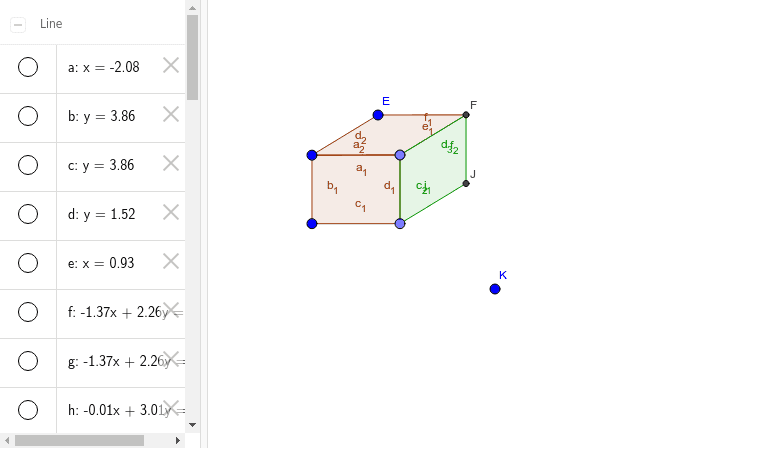
This example demonstrates the step-by-step geometric construction of a cube in a 2D GeoGebra environment, illustrating the spatial correspondence among its faces, edges, and vertices. Core mathematical concepts include solid geometry, cubes, polygons, orthogonal lines, intersection points, and parallel/perpendicular relationships between faces. The construction uses Point to define base vertices, Line and OrthogonalLine to build perpendicular edges, Polygon to create the cube faces (poly1, poly2, poly3), and Intersect to locate hidden vertices and edges by computing intersections of lines and planes. Suitable for middle school and high school geometry instruction, classroom demonstrations, and independent student exploration of cube properties and projections.
GeoGebra Commands & Parameters
Line(A, B) → aOrthogonalLine(A, a) → bOrthogonalLine(A, a) → cOrthogonalLine(B, a) → dPoint(d) → COrthogonalLine(C, d) → ePoint(e) → DPolygon(A, D, C, B) → poly1, a_1, d_1, c_1, b_1Line(A, E) → fLine(D, f) → gLine(E, a_1) → hIntersect(g, h) → FPolygon(A, E, F, D) → poly2, a_2, e_1, f_1, d_2Point(g) → GLine(G, F) → iPoint(i) → HPoint(h) → ILine(H, I) → jLine(C, i) → kLine(F, d_1) → lIntersect(k, l) → JPolygon(D, F, J, C) → poly3, d_3, f_2, j_1, c_2