
3D Net of a Cube
Loading the math board and drawing, please wait…
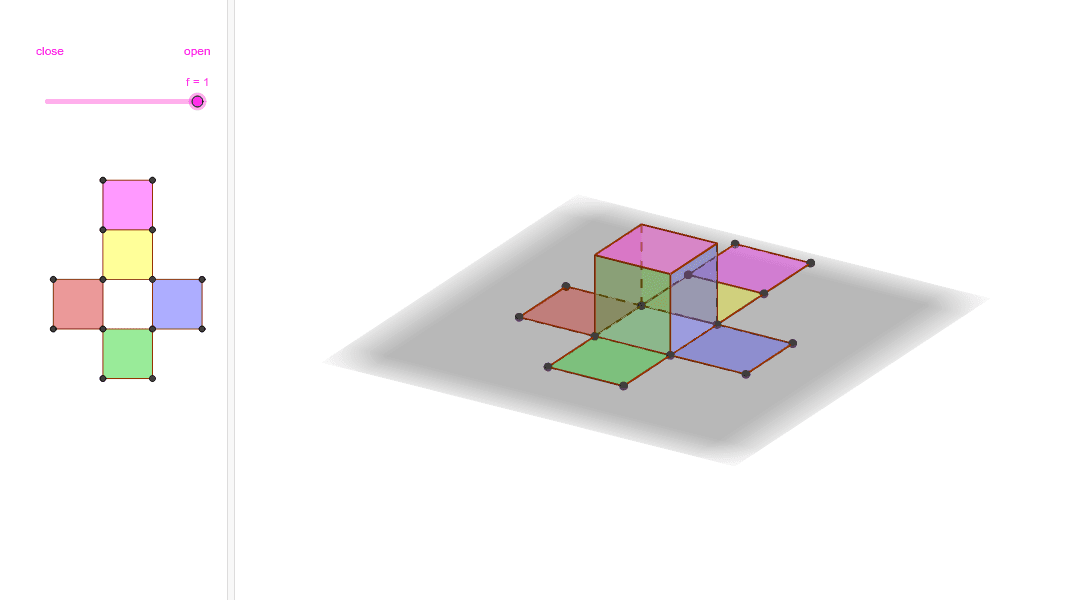
This example demonstrates the net of a cube. The core mathematical concept involved is solid geometry. Using GeoGebra commands such as Point, Polygon, Prism, Net, etc., the faces of the cube can be constructed. Suitable for students at junior high school level and above.
GeoGebra Commands & Parameters
Point(Circle[A, 4]) → BPolygon(A, B, C, D) → poly1, a, b, c, dPrism(poly1, 4) → e, E, edgeAE, edgeBF, edgeCG, edgeDH, edgeEF, edgeFG, edgeGH, edgeEH, F, G, H, faceABFE, faceBCGF, faceCDHG, faceADHE, faceEFGHNet(e, f) → g, I, R, S, T, U, V, faceIJKL, faceIJNM, faceJKPO, faceKLRQ, faceILST, J, faceMNUV, edgeIJ, edgeJK, edgeKL, edgeIL, edgeIM, edgeMN, edgeJN, edgeJO, edgeOP, K, edgeKP, edgeKQ, edgeQR, edgeLR, edgeLS, edgeST, edgeIT, edgeNU, edgeUV, edgeMV, L, M, N, O, P, Q
AI Drawing Prompt Reference
Draw a net of a cube. Start with a square as the base, then construct a cube with side length 4 above it. Next, unfold the cube's surface into a flat pattern consisting of six connected squares, with one central square and five surrounding squares, forming a cross-like shape. Preserve the relative positions of the faces and label all vertices and edges.
The prompt above was compiled from the original drawing commands and is for reference only.