
Geometric Construction for the Volume of a Cylinder
Loading the math board and drawing, please wait…
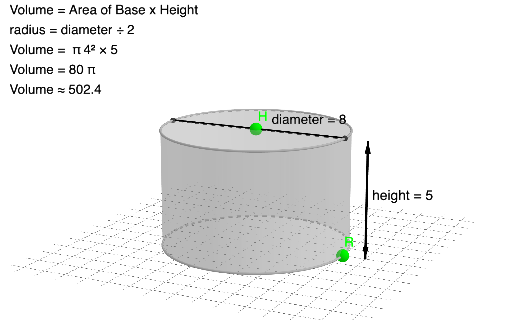
This example demonstrates how to visualize and build relationships behind the volume of a cylinder using constructive 3D geometry. It highlights the correspondence between the cylinder’s solid structure and its circle-based cross-section constraints, using symmetry to simplify the setup. Key math concepts include circle geometry, the 3D solid-geometry idea behind cylinder volume, orthogonal projections/constraints via OrthogonalLine, and symmetry through reflection using Mirror. Construction workflow: Intersect is used to locate essential points from multiple geometric relationships; Circle creates the circular cross-section; Cylinder builds the actual cylindrical solid; OrthogonalLine defines perpendicular height or direction constraints; Line, Segment, and Vector specify orientations and measurable geometric components; Mirror generates reflected auxiliary elements to enforce a symmetric configuration; and text labeling (text1) is used to present key quantities and structure. Suitable for middle school through early undergraduate solid geometry, classroom demonstrations, and geometry construction/dynamic visualization practice.
GeoGebra Commands & Parameters
Intersect(zAxis, xAxis) → APoint(xAxis) → RCircle(zAxis, R) → cPoint(zAxis) → HCylinder(c, z(H)) → e, f, gOrthogonalLine(R, xOyPlane) → hIntersect(h, f, 1) → BLine(H, B) → iLine(A, R) → jVector(C, D) → uVector(D, C) → vSegment(D, C) → kMirror(B, H) → B'Segment(B', B) → l
AI Drawing Prompt Reference
Create a 3D geometric construction diagram of a cylinder using symmetry. Use the given coordinate axes to define the cylinder’s main axis, set a radius point to locate the center of the circular cross-section, and place a height reference point on the axis. Construct the circle of the cross-section lying in the corresponding base plane, then build the cylinder solid from that circle and the height direction. Add an orthogonal constraint line related to the radius direction on the base plane, find an intersection point on the cylinder surface that ties this constraint to the solid, and draw a line connecting the height reference point to that intersection to represent the height direction. Include auxiliary orientation elements (lines/vectors/segment along the radius-related directions). Reflect the key point across the height reference plane to obtain its symmetric counterpart and draw the segment between the symmetric point and the original point to emphasize the symmetry.
The prompt above was compiled from the original drawing commands and is for reference only.