
Geometric Construction: Copying an Angle
Loading the math board and drawing, please wait…
In collections
Constructions Crash Course for Teachers
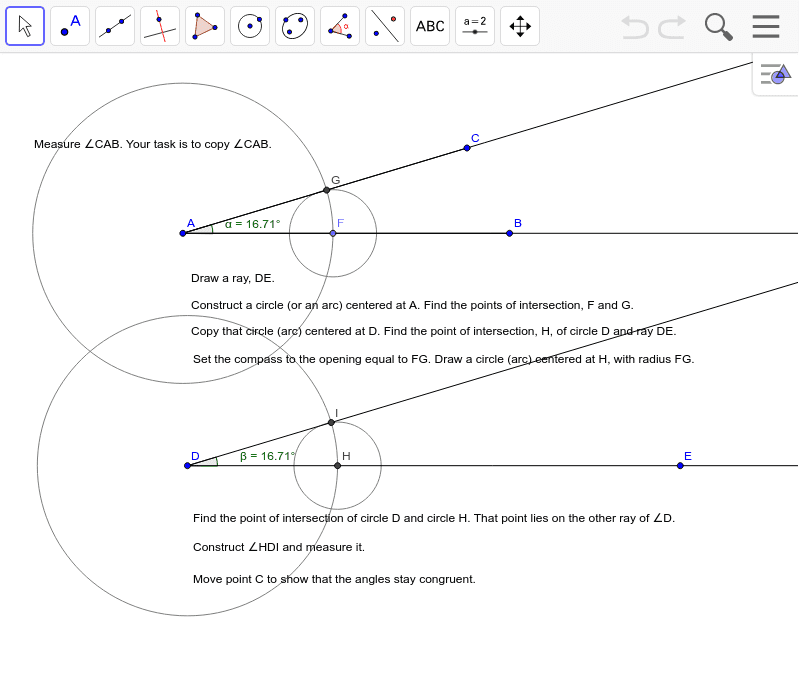
This example demonstrates the step-by-step process of duplicating a given angle using a compass and straightedge approach within GeoGebra. The construction relies on the mathematical principles of congruent triangles and the properties of circles (constant radii). The author utilizes GeoGebra commands such as Segment, Circle, Intersect, and Ray to define points and arcs that transfer the angular opening from the original angle $\alpha$ to a new vertex. This resource is designed as a foundational exercise for middle school geometry students or as a crash-course tutorial for educators mastering basic geometric constructions.
GeoGebra Commands & Parameters
Segment(A, B) → aSegment(A, C) → bAngle(B, A, C) → αRay(D, E) → cPoint(a) → FCircle(A, F) → dIntersect(d, b, 1) → GCircle(D, Radius[d]) → eIntersect(e, c, 1) → HCircle(H, Segment[F, G]) → fIntersect(e, f, 1) → IRay(D, I) → gCircle(F, G) → hAngle(H, D, I) → βRay(A, B) → iRay(A, C) → j
AI Drawing Prompt Reference
Create a geometric construction demonstrating how to copy an angle. Start by drawing an initial angle formed by two rays. Draw an arc centered at the vertex that intersects both sides of the angle. On a separate starting ray, draw an arc with the same radius centered at a new vertex to find an intersection point. Then, draw another arc centered at this new intersection point with a radius equal to the distance between the two points on the original angle's sides. Finally, draw a ray from the new vertex through the intersection of the two arcs to complete the duplicated angle.
The prompt above was compiled from the original drawing commands and is for reference only.