
Geometric Construction and Visualization of Centered Pentagonal Numbers
Loading the math board and drawing, please wait…
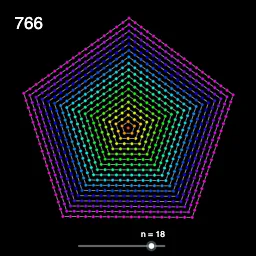
This example demonstrates the number–shape relationship of centered pentagonal numbers by constructing successive centered pentagons on the coordinate plane and associating each configuration with its corresponding value as n increases. The key math concepts include centered polygonal (pentagonal) numbers, sequences and generation of term values, and the idea of building polygon outlines from computed vertex coordinates. Construction uses GeoGebra commands revealed in the command summary: Sequence to generate parameter lists (e.g., n and size-related parameters), Zip and Length to pair/iterate over generated elements, Join and Element to combine and index lists of points/values, and Text to place labels. The construction objects such as PentPoints, PolyLinesL, and multiple text/label objects (A1–A21) indicate that the vertices and polyline edges are computed and then connected step-by-step to form each centered pentagon, matching the visual growth with the centered pentagonal number sequence. Suitable for middle school through early undergraduate audiences for lessons on sequences, pattern discovery, and geometry-based number visualizations.
GeoGebra Commands & Parameters
Sequence(1, N) → PnSequence(1, M) → LmZip(Zip[(((m - 1) * cos(-0.95 + ((2 * π / 5) * n))), ((m - 1) * sin(-0.95 + ((2 * π / 5) * n)))), n, Pn], m, Lm) → PentLLength(PentL) → sizePetLZip(PolyLine[Join[{Points, First[Points]}]], Points, PentL) → PolyLinesLLength(PolyLinesL) → sizePolyLinesLZip(((5 * n^(2)) - (5 * n) + 2) / 2, n, Lm) → PentValuesJoin({{(0, 0)}, RemoveUndefined[Zip[Sequence[Point[Element[PolyLinesL, n], k / (Element[PentValues, n] - Element[PentValues, n - 1])], k, 0, Element[PentValues, n] - Element[PentValues, n - 1] - 1], n, Lm]]}) → PentPointsElement(PentPoints, A1) → B1Element(PentPoints, A2) → B2Element(PentPoints, A3) → B3Element(PentPoints, A4) → B4Element(PentPoints, A5) → B5Element(PentPoints, A6) → B6Element(PentPoints, A7) → B7Element(PentPoints, A8) → B8Element(PentPoints, A9) → B9Element(PentPoints, A10) → B10Element(PentPoints, A11) → B11Element(PentPoints, A12) → B12Element(PentPoints, A13) → B13Element(PentPoints, A14) → B14Element(PentPoints, A15) → B15Element(PentPoints, A16) → B16Element(PentPoints, A17) → B17Element(PentPoints, A18) → B18Element(PentPoints, A19) → B19Element(PentPoints, A20) → B20Element(PentPoints, A21) → B21Element(PolyLinesL, A1) → C1Element(PolyLinesL, A2) → C2Element(PolyLinesL, A3) → C3Element(PolyLinesL, A4) → C4Element(PolyLinesL, A5) → C5Element(PolyLinesL, A6) → C6Element(PolyLinesL, A7) → C7Element(PolyLinesL, A8) → C8Element(PolyLinesL, A9) → C9Element(PolyLinesL, A10) → C10Element(PolyLinesL, A11) → C11Element(PolyLinesL, A12) → C12Element(PolyLinesL, A13) → C13Element(PolyLinesL, A14) → C14Element(PolyLinesL, A15) → C15Element(PolyLinesL, A16) → C16Element(PolyLinesL, A17) → C17Element(PolyLinesL, A18) → C18Element(PolyLinesL, A19) → C19Element(PolyLinesL, A20) → C20Element(PolyLinesL, A21) → C21Text(Element[PentValues, n]) → text1
AI Drawing Prompt Reference
Create on a coordinate plane a sequence of centered pentagons. Starting from the origin, for integer n in a chosen range, compute each pentagon’s vertex coordinates using fixed five-direction angles and a radius/scale that depends on n. Gather the computed vertices for each n and connect them in order, closing the polygon to form the pentagonal outlines. Also compute the corresponding centered pentagonal number value for each n, and place text labels next to several of the generated pentagon configurations and values to indicate the term associated with each growing outline.
The prompt above was compiled from the original drawing commands and is for reference only.