
GeoGebra Vector Example: Geometric Construction and Vector Operations
Loading the math board and drawing, please wait…
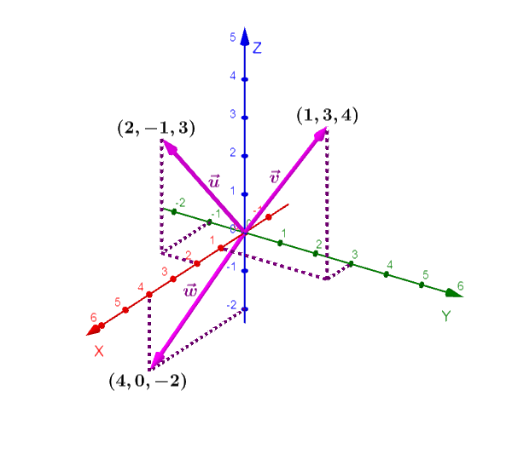
This example demonstrates how to create vectors, segments, and midpoints using GeoGebra. Key mathematical concepts include vectors, geometric construction, linear programming, and scatter plots. The construction involves commands like Vector, Segment, and Midpoint, along with objects such as O, A, B, C. It is suitable for middle school students learning geometry and vectors, or for teaching demonstrations and self-exploration.
GeoGebra Commands & Parameters
Vector(O, A) → uVector(O, B) → vVector(O, C) → wSegment(A, E) → fSegment(E, F) → gSegment(E, D) → hSegment(G, B) → iSegment(B, H) → jSegment(C, J) → kSegment(J, I) → lSegment(J, K) → mSegment(O, C) → nSegment(O, A) → pSegment(O, B) → qMidpoint(n) → LMidpoint(p) → MMidpoint(q) → N
AI Drawing Prompt Reference
Start from the origin, draw three vectors to three distinct points, creating three directed segments. Then connect these points to several other points with straight segments, forming a network of lines that outline a geometric shape. Mark the midpoints of the three segments from the origin. The final figure shows a planar construction with vectors, segments, and midpoints, illustrating vector operations and geometric relationships.
The prompt above was compiled from the original drawing commands and is for reference only.