
GeoGebra Pyramid Solid Geometry Construction
Loading the math board and drawing, please wait…
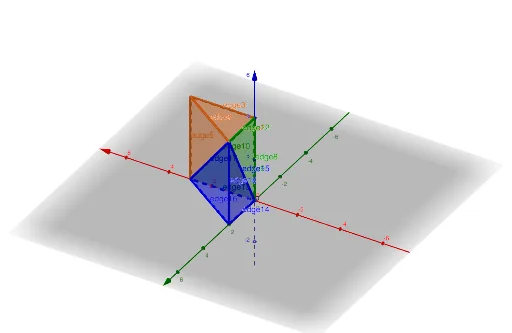
This example demonstrates how to construct pyramid solid geometry models using GeoGebra commands.①What it shows: Creates multiple pyramid 3D models, displaying the spatial relationships between faces, edges, and vertices.②Core math concepts: Definition of pyramids in solid geometry, classification of faces (lateral edges, base), and spatial relationships between vertices and edges.③Construction details: Uses the Pyramid command to build pyramids, draws 12 faces (face1-face12) and 18 edges (edge1-edge18), with parameters a, b, c controlling the sizes of different pyramids, clearly showing the spatial composition of multiple pyramids.④Target audience: Middle school to high school mathematics courses, suitable as an introductory teaching aid for solid geometry to help students understand pyramid structural features, and can also be used for exploring pyramid volume formula instruction.
GeoGebra Commands & Parameters
Pyramid((0, 0, 4), (3, 0, 0), (0, 2, 4), (3, 0, 4)) → a, face1, edge6, face2, face4, face3, edge1, edge4, edge2, edge3, edge5Pyramid((0, 0, 0), (3, 0, 0), (0, 0, 4), (0, 2, 4)) → b, face5, edge12, face6, face8, face7, edge7, edge10, edge8, edge9, edge11Pyramid((0, 0, 0), (3, 0, 0), (0, 2, 0), (0, 2, 4)) → c, face9, edge18, face10, face12, face11, edge13, edge16, edge14, edge15, edge17
AI Drawing Prompt Reference
Draw a square pyramid with the apex directly above the base. First, create the base vertices A(0,0,0), B(3,0,0), C(0,2,0), D(3,2,0), and the apex E(0,0,4). Then, draw another square pyramid with the apex directly above the base, base vertices F(0,0,0), G(3,0,0), H(0,2,0), I(0,2,4), and apex J(0,0,4). Finally, draw a third square pyramid with the apex directly above the base, base vertices K(0,0,0), L(3,0,0), M(0,2,0), N(0,2,4), and apex O(0,0,4).
The prompt above was compiled from the original drawing commands and is for reference only.