
Tangled Triangles
Loading the math board and drawing, please wait…
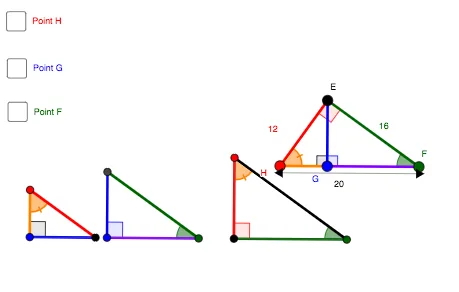
This example demonstrates the dynamic construction of geometric relationships involving triangles, circles, and lines, focusing on geometric mean and triangle properties. It involves commands like Line, Semicircle, Point, Angle, OrthogonalLine, Intersect, Circle, and Segment. Suitable for high school mathematics education to explore geometric constructions and dynamic geometry phenomena.
GeoGebra Commands & Parameters
Line(H, F) → aSemicircle(H, F) → cPoint(c) → EAngle(H, E, F) → αOrthogonalLine(E, a) → eIntersect(a, e) → GAngle(F, G, E) → βOrthogonalLine(H, a) → lOrthogonalLine(F, a) → mPoint(l) → E_{1}Circle(H, Segment[H, E_{1}]) → pCircle(F, Radius[p]) → qIntersect(q, m, 1) → F_{1}Segment(E_{1}, F_{1}) → nCircle(E_{1}, Segment[E_{1}, H]) → kCircle(F_{1}, Radius[k]) → rIntersect(k, l, 1) → G_{1}Intersect(r, m, 1) → H_{1}Segment(E, H) → bSegment(E, F) → dSegment(E, F) → fSegment(E, H) → hSegment(E, G) → gSegment(H, F) → iSegment(H, G) → sSegment(G, F) → tSegment(E, G) → a_1Line(I, J) → b_1Circle(I, Segment[G, E]) → c_1Intersect(c_1, b_1, 2) → KCircle(I, Segment[G, H]) → d_1Circle(K, Segment[H, E]) → e_1Intersect(d_1, e_1, 1) → LSegment(I, K) → g_1Angle(K, I, L) → γPoint(b_1) → MCircle(M, Segment[G, F]) → k_1Intersect(k_1, b_1, 2) → NCircle(M, Segment[G, E]) → p_1Circle(N, Segment[F, E]) → q_1Intersect(p_1, q_1, 1) → OSegment(O, M) → i_1Segment(M, N) → j_1Angle(N, M, O) → δPoint(b_1) → PCircle(P, Segment[E, F]) → r_1Intersect(r_1, b_1, 2) → QSegment(P, Q) → m_1Circle(P, Segment[E, H]) → s_1Circle(Q, Segment[F, H]) → t_1Intersect(s_1, t_1, 1) → RSegment(P, R) → n_1Angle(Q, P, R) → εSegment(I, L) → b_2Segment(L, K) → c_2Segment(K, I) → d_2Segment(O, M) → e_2Segment(M, N) → f_2Segment(N, O) → g_2Segment(R, P) → h_2Segment(P, Q) → i_2Segment(Q, R) → j_2Segment(L, K) → h_1Segment(L, I) → f_1Segment(O, M) → k_2Segment(O, N) → l_1Angle(E, G, H) → ζAngle(E, F, G) → ηAngle(R, Q, P) → θAngle(O, N, M) → ιAngle(G, H, E) → κAngle(I, L, K) → μAngle(P, R, Q) → λCircle(R, Segment[H, G]) → p_2Intersect(p_2, j_2, 1) → SSegment(R, Q) → a_2
AI Drawing Prompt Reference
Draw a horizontal segment as a base, and construct a semicircle on it. Pick a point on the semicircle, connect it to the endpoints of the base to form a triangle, and drop a perpendicular from that point to the base, marking the foot. Then draw perpendiculars at both endpoints of the base, choose a point on one perpendicular, and use it as a center to draw a circle with radius equal to the distance to the nearest endpoint. With the other endpoint as center, draw another circle of the same radius. These circles intersect the other perpendicular, giving new points; connect these points to form a segment. Then, using these new points as centers, draw multiple circles with specified radii, and through their intersections construct more triangles and segments, labeling relevant angles. Finally, on another line, repeat a similar construction to generate more triangles and label their angles.
The prompt above was compiled from the original drawing commands and is for reference only.