
GeoGebra Geometric Transformations: Translation, Reflection, Rotation
Loading the math board and drawing, please wait…
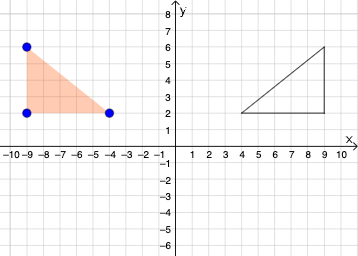
This example demonstrates how to perform geometric transformations in GeoGebra, including translation, reflection, and rotation. Key mathematical concepts involve coordinate geometry, vector operations, and symmetry. Construction steps include using Polygon, Mirror, and Segment commands to create triangles, with parameters like t1, c, a, b for transformations. Suitable for middle school students learning geometric transformation principles or for geometry drawing instruction support.
GeoGebra Commands & Parameters
Polygon(A, B, C) → t1, c, a, bMirror(A, yAxis) → A'_{1}Mirror(B, yAxis) → B'_{1}Mirror(C, yAxis) → C'_{1}Polygon(A'_{1}, B'_{1}, C'_{1}) → t1', c', a', b'Segment(C'_{1}, B'_{1}) → fSegment(B'_{1}, A'_{1}) → gSegment(A'_{1}, C'_{1}) → h
AI Drawing Prompt Reference
On a coordinate plane, draw an initial triangle with three vertices. Use the vertical axis as the line of symmetry to reflect each of the three vertices across this axis, obtaining three corresponding mirrored vertices. Connect these mirrored vertices to form the reflected triangle, then draw its three side segments by linking each pair of mirrored vertices, including all the edges of the reflected triangle.
The prompt above was compiled from the original drawing commands and is for reference only.