
GeoGebra Geometric Construction: Ratio and Vector Applications
Loading the math board and drawing, please wait…
This example demonstrates constructing complex ratio relationships through geometric methods. Key mathematical concepts include vector operations, special point positioning, and logarithmic function graph analysis. Construction involves using GeoGebra commands like Line, Intersect, OrthogonalLine, combined with objects such as Point, Ray, and Segment for dynamic creation. Suitable for high school students learning geometric transformations and function graph analysis, or for mathematical modeling teaching practice.
GeoGebra Commands & Parameters
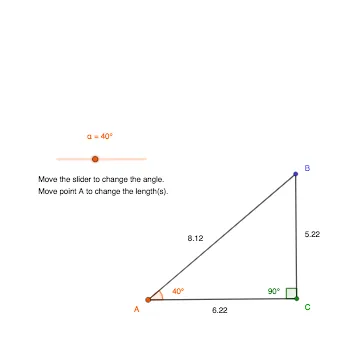
Line(A_1, B_1) → fLine(C_1, D) → gIntersect(g, f) → COrthogonalLine(C, f) → hPoint(f) → FRay(C, F) → iPoint(i) → ASegment(C, A) → jRotate(C, α, A) → E'Angle(C, A, E') → βRay(A, E') → kIntersect(k, h) → BSegment(A, B) → lSegment(B, C) → mAngle(B, C, A) → γ
AI Drawing Prompt Reference
Draw two intersecting lines, one passing through two fixed points and the other through a fixed point and a moving point, intersecting at a point. Construct a perpendicular line to the first line through this intersection. Pick a point on the first line, draw a ray from the intersection to this point, and place another point on the ray. Connect the intersection and the ray point, then rotate the intersection around the ray point by an angle to get a new point. Draw a ray from the ray point to the new point, intersecting the perpendicular line at another point. Connect the three key points to form a triangle and mark one of its interior angles.
The prompt above was compiled from the original drawing commands and is for reference only.